Marketplace: find, buy and sell prompts, images, agents and courses
Browse listings by category and licence, favourite and follow, buy with your wallet, find purchases in your library, and prepare your own listing as a seller.
What the Marketplace is
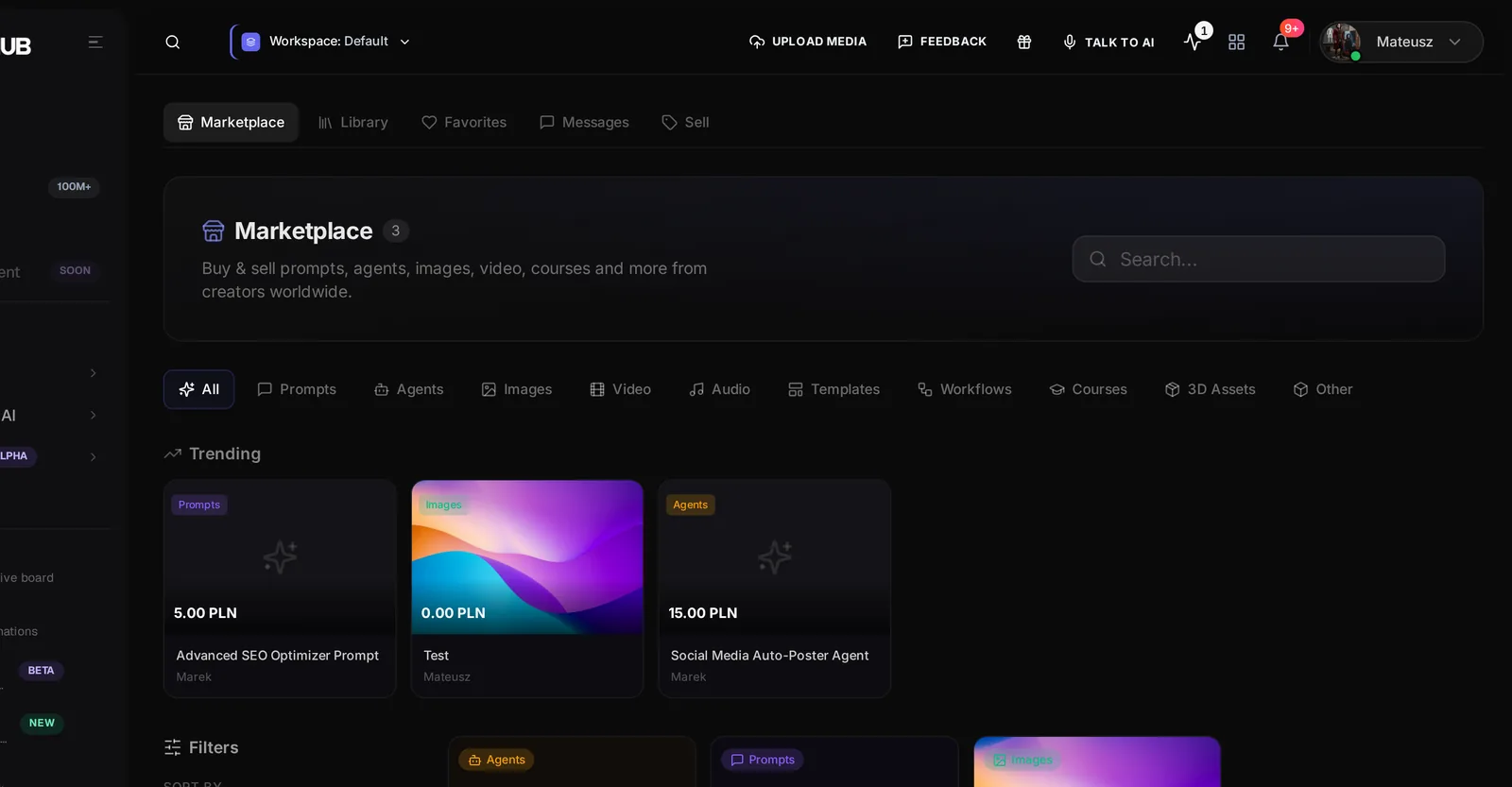
The Marketplace is a store inside FOTOhub where creators sell digital work to other users: prompts and prompt systems, AI agents and workflows, images, video, audio, templates, 3D assets, courses and other files. For a marketer or a shop owner it works in two directions. As a buyer you shortcut work: a tested prompt pack, a social template, a stock image with a commercial licence. As a seller you turn what you already produce into a second income.
Browse, filter and read a listing
- Search or choose a category Type in Search... or click a tab: All, Prompts, Agents, Images, Video, Audio, Templates, Workflows, Courses, 3D Assets, Other. A Trending strip shows what is popular, and the grid loads more as you scroll.
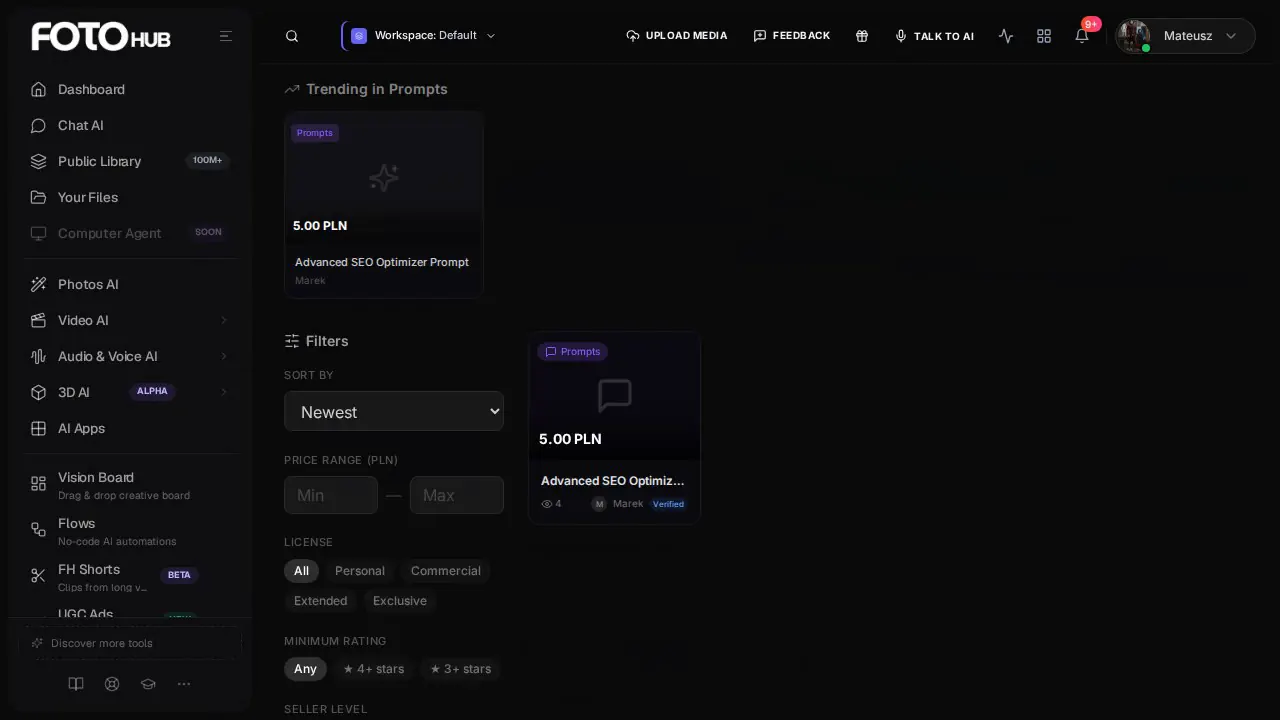
- Narrow with filters Sort by Newest, Most popular, Top rated, Price low to high or high to low. Set a Price range (in PLN), a License (Personal, Commercial, Extended, Exclusive), a Minimum rating (4+ or 3+ stars) and a Seller level (Verified, Pro, Top Seller). Reset filters clears everything.
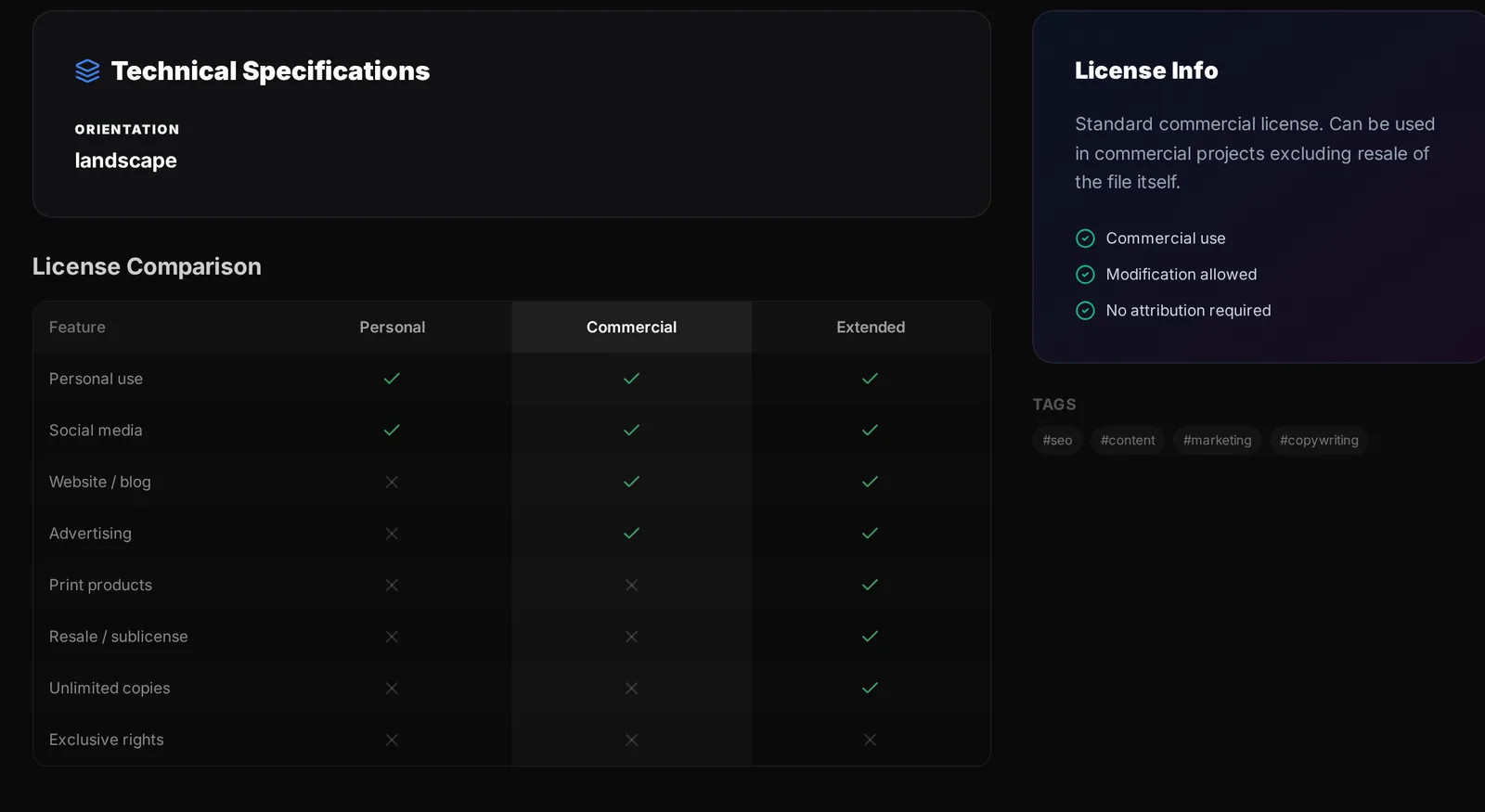
- Open a listing The listing page shows the preview, the date added, views, downloads and rating, the licence, Technical Specifications, a License Comparison table, Reviews with a Verified purchase tag and seller replies, and the seller card with Follow.
- Save it for later The heart on a card or listing adds it to Favorites. Follow on the seller card tells you about their new work. Ask seller sends a question before you buy.
Read the licence before you buy
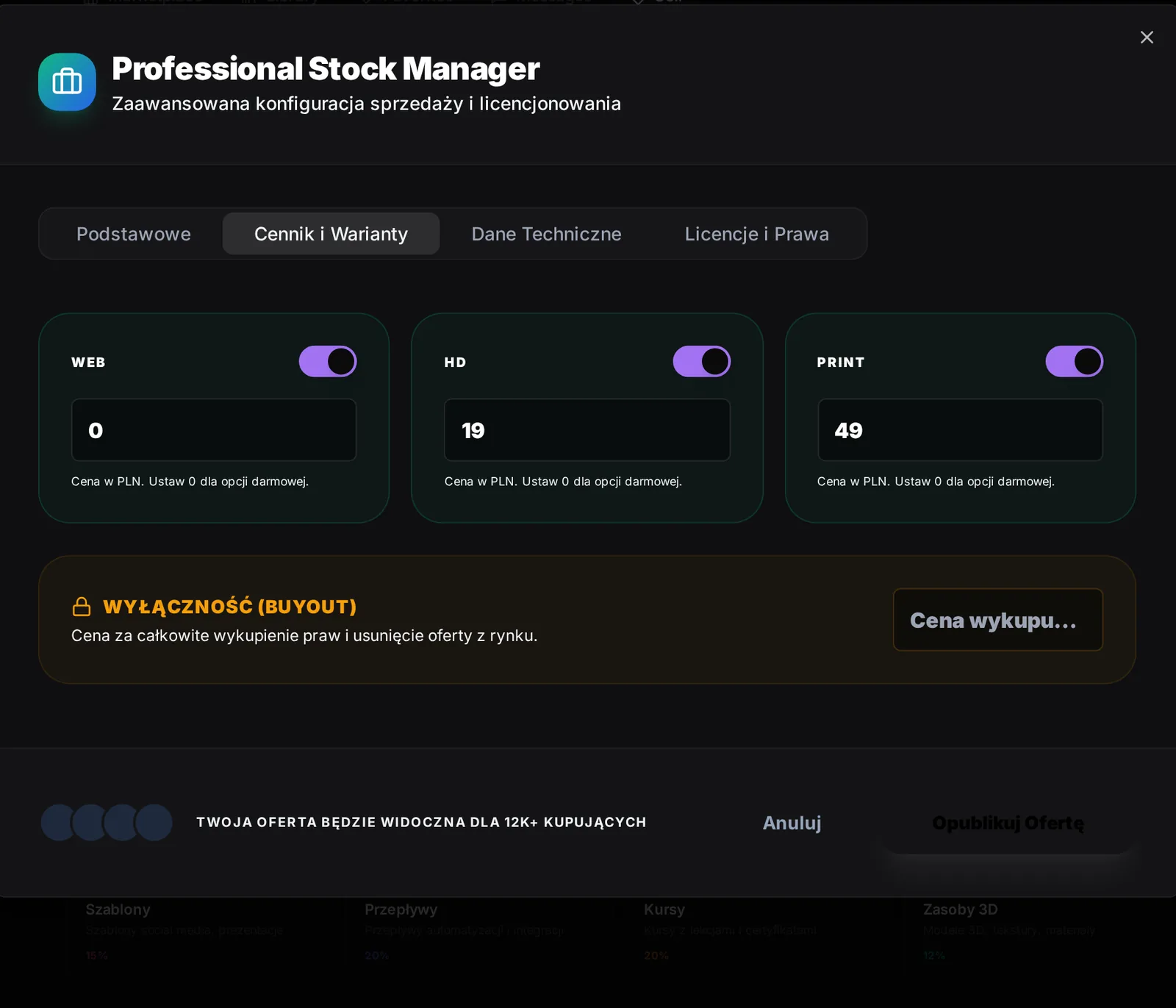
For marketing use the licence matters more than the price. Personal is for your own use. Commercial lets you use the work in client and business projects. Extended widens the rights, for example for resale in products. Exclusive is a buyout. The License Comparison table on the listing spells out what each tier allows. Images, video and 3D listings may offer versions: WEB for screens at 72 dpi, HD / 4K, and Print / RAW, each shown only if the seller enabled it.
Buy and find what you bought
Press Buy Now on a listing (free listings say Download Free). The dialog Finalize Purchase asks you to select a payment method. FOTOhub Wallet shows your available balance and is disabled when the balance is too small. Paying from the wallet completes the purchase immediately, credits the seller and sends you to the confirmation page. You cannot buy your own listing.
| Category | What you get after purchase |
|---|---|
| Images, video, audio, templates, 3D, other files | A Download button. A purchase allows five downloads by default, the signed link lasts fifteen minutes. |
| Prompts | Copy JSON to copy the prompt data. |
| Agents and workflows | Copy JSON with the configuration. |
| Courses | Start Course opens the course viewer with sections, lessons and saved progress. |
Everything you bought lives in two places. My Purchases is a list grouped by month with the amount, the version and the delivery button. Library shows completed purchases only, with category tabs and a grid or list toggle. Favorites lists your hearts, and Messages is the inbox for questions to and from sellers.
Become a seller
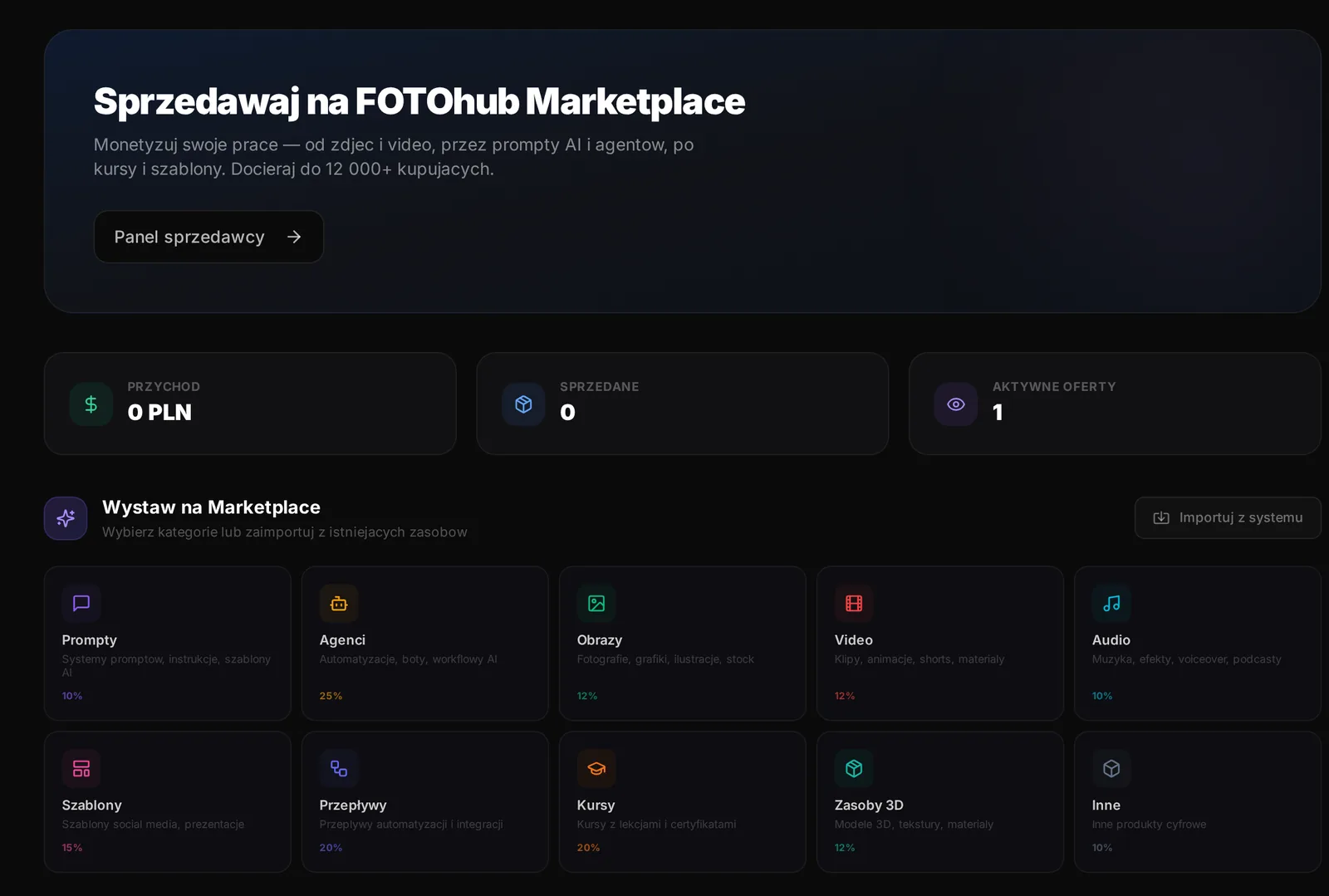
Any signed-in user can list. There is no separate application. Open Sell in the sub-menu. The page shows your seller panel (revenue, sales, active listings), a Wystaw na Marketplace panel with category cards and the platform fee for each, an import from your own agents, audio, images and video, and a three step explanation. The full seller area is the Sales Center at /fh/monetization.
The listing form
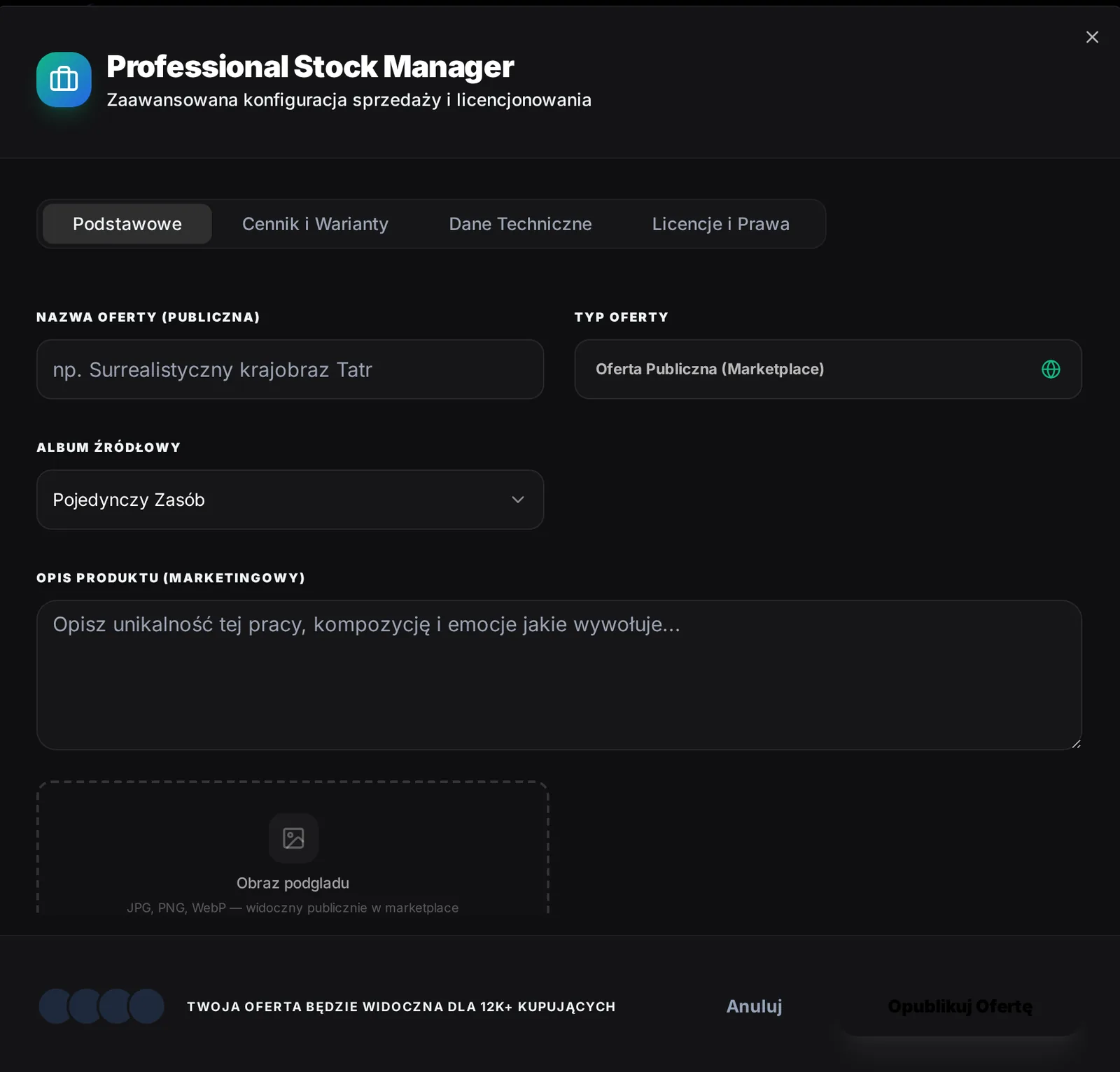
Pressing a category opens the listing editor, a dialog called Professional Stock Manager with four tabs. The labels are in Polish:
| Tab | What you fill in |
|---|---|
| Podstawowe (Basics) | Name of the offer (at least three characters), type, source album, description, preview image, a sample for audio and video, category, orientation and visibility (public or private). |
| Cennik i Warianty (Pricing and versions) | Web, HD and Print versions each with a switch and a PLN price (0 means free), an exclusive buyout price, and the deliverable file for file categories. |
| Dane Techniczne (Technical data) | Device, AI model, prompt and tags. |
| Licencje i Prawa (Licences and rights) | Commercial, Editorial or Extended, a preview watermark switch and custom terms. |
Some categories add fields. A prompt asks for the system prompt (required), an optional user prompt template with {{placeholders}} and a recommended model. An agent or workflow is imported from one of your own, with the node count and the credits per run. A course asks for difficulty, duration, and sections with lessons of type text, video, quiz or exercise. A server-side check removes keys and tokens from the files you attach and tells you how many items it removed.
Fees and payouts
FOTOhub keeps a percentage of each sale. The Sell page prints the rate on every category card: it is 10 percent for prompts, audio and other files, 12 percent for images, video and 3D, 15 percent for templates, 20 percent for workflows and courses, and 25 percent for agents. Earnings accumulate in the wallet of the Sales Center. To take money out, open Wallet, press Withdraw Funds, enter the amount and a Polish IBAN, and press Request Withdrawal. Withdrawals are processed manually and the request is recorded as requested; the page does not show a payout status afterwards.
Two worked sessions
Find a commercially usable prompt pack
Goal. A shop owner wants a ready prompt for product descriptions, usable on a business site.
Input you can copy.
Category: Prompts. Sort by: Top rated. License: Commercial. Open the first result and read the License Comparison.| Setting | Value |
|---|---|
| Category | Prompts |
| Sort by | Top rated |
| License | Commercial |
Why it works. Filtering first by category and licence removes listings you could not use anyway. The comparison table then tells you exactly what Commercial allows, before you pay.
Prepare a listing without publishing it
Goal. See what a seller must have ready: a name, a price in PLN per version, a licence and a deliverable.
Input you can copy.
Sell, then the Prompts card. Fill the name, the system prompt, and open the Pricing tab. Close the dialog without saving.| Setting | Value |
|---|---|
| Category | Prompts |
| Price | 0 (free) while testing |
Why it works. Closing the editor discards the draft, so nothing becomes public. Use this walk-through to collect your assets and price, then come back and save when you are ready.
What makes a listing sell
- A name that says what it is. "Advanced SEO optimiser prompt for product pages" beats "Super prompt v2".
- A preview that shows the result, not the tool. For images, a sharp preview image. For prompts, an example output in the description. For agents, a short description of what it does and what it needs.
- Honest licence terms. Choose the licence that matches how you want buyers to use the work, and fill the custom terms if the standard ones do not fit.
- Prices by version. Offer the web version cheaply and charge more for HD and print. A price of 0 makes a version free, which is a good way to attract first buyers.
- Tags that match what buyers search. Use the words a buyer would type, not your internal names.
- No secrets inside. The editor removes keys and tokens it finds and tells you how many, but you remain responsible for what you upload.
| Category | What to include | Fee shown on the Sell page |
|---|---|---|
| Prompts | System prompt, optional user template with placeholders, recommended model | 10 percent |
| Images, video, 3D | Preview, versions for web, HD and print, licence | 12 percent |
| Templates | A usable file and a clear preview | 15 percent |
| Workflows and courses | Configuration or lessons, difficulty, duration | 20 percent |
| Agents | Configuration, node count, credits per run, required integrations | 25 percent |
Questions and troubleshooting
- "Insufficient balance".
- The wallet does not cover the price. Top up the wallet, or choose another listing.
- "Download limit reached".
- A purchase allows a fixed number of downloads, five by default. Save the file after downloading, and contact the seller if you need a reset.
- "Listing not found or not active".
- The seller removed or hid it.
- "Cannot purchase your own listing".
- You cannot buy your own work. Use another account to test.
- Where are the Collections?
- The Collections page shows curated sets when curators publish them, and is empty until then.