The new FOTOhub video editor
A video editor rebuilt from scratch, in the browser: multi-track timeline, captions that export exactly as set, audio with waveforms and AI on the canvas. Click-to-select, background removal, object removal and export included in every paid plan.
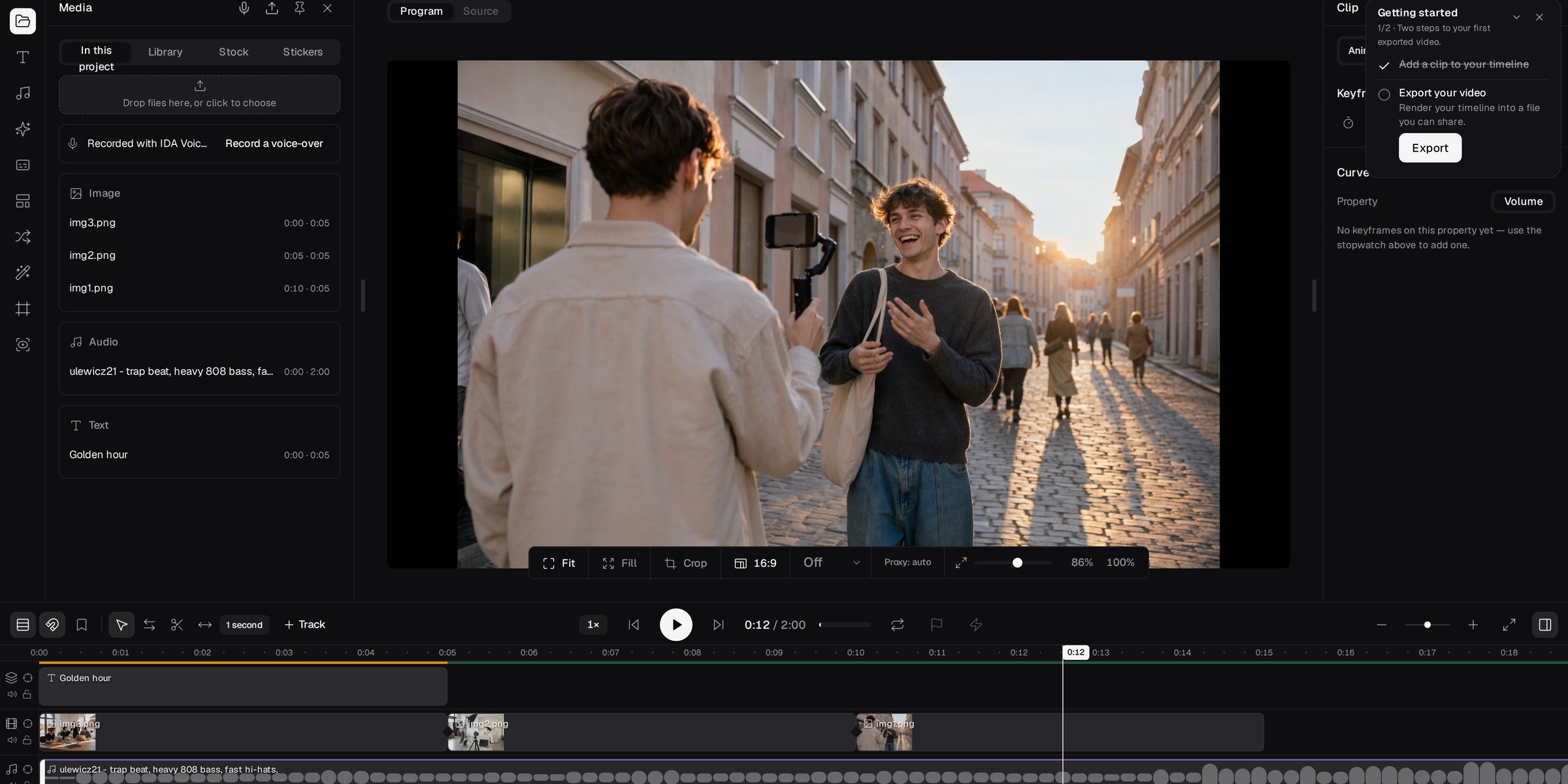
FOTOhub's new video editor is now available to everyone. We built it from scratch: a new timeline, a new preview canvas, a new export engine and AI tools that work directly on your clips, without leaving the project. It all runs in the browser, with nothing to install and no need for a powerful computer, because the heavy lifting happens on our servers and graphics cards.
The most important change is not visible at first glance. On every paid plan, from Starter up, the editor's AI operations and the final export are included in the price. There is no meter on object selection, no charge for removing something from the frame, no surcharge for rendering. You can try, undo and try again.
In short
- A completely new editor with a multi-track timeline, snapping, markers and full undo history.
- 19 transitions, 22 filters and keyframes with four easing curves.
- 12 caption styles and automatic speech-to-caption transcription.
- AI on the canvas: select an object with a click, a box or words, and the editor tracks it through the whole clip and can remove it.
- Music and sound effects generated inside the editor, without switching to other tools.
- Export from 720p to 4K with ready presets for TikTok, Reels, Shorts, YouTube and X.
- Cloud autosave, three interface languages: English, Polish and German.
- Included in your plan: AI operations on our cards and export use no credits on any paid plan.
Open the editor from the video section of the app, or go straight to fotohub.app/fh/editor/lite-v2.
Why we rewrote it
The previous editor did well at simple jobs: trim a clip, add a caption, export. But once creators started cutting full ads, product films and social content in it, its limits showed. What you saw on screen did not always match what came out in the file. Text could land somewhere other than in the preview, and caption styling got lost on the way to the render.
We decided patching was pointless. The new editor rests on one principle: what you see on the canvas is what you get in the export. The position, scale, rotation and style of every element are calculated in one place, and the preview and the render read the same data. Before switching the old editor off, we listed every feature creators actually used and checked that each one had a counterpart in the new one.
Timeline
The timeline is where an editor spends most of the day, so we started there.
- As many tracks as you need: video, images, text, music and voiceover, each on its own layer, with reorderable tracks.
- Trim and split: shorten a clip by dragging its edge, or split it at the playhead.
- Professional trim modes: roll, slip and slide, meaning moving the cut point between two clips, shifting content inside a clip, and moving a clip between its neighbours.
- Ripple: deleting or shortening a clip closes the gap instead of leaving a hole.
- Snapping to clip edges and the playhead, toggled with a single switch.
- Markers and chapters to flag key moments and jump around the project.
- Multi-select, copy, paste and duplicate.
- Timeline zoom and scroll, from the whole film down to single frames.
- Clip speed: rush through a scene or slow down the key moment, with sound kept.
- Detach audio from video to trim and place a clip's sound separately.
- Undo and redo for every operation, with history saved as you work.
Canvas and clip properties
The preview is not just a player window. It is a canvas where you select elements and move, scale and rotate them directly with the mouse. The selection box wraps exactly what you see, text included. Select an element and a properties panel opens on the right:
- Position, scale, rotation and opacity for every clip.
- Crop and fitting the material to the project format.
- Six blend modes for overlays, light leaks and textures.
- Volume plus audio fade in and fade out per clip.
- Project formats: 16:9, 9:16, 1:1, 4:5 and 4:3, with safe-area guides for TikTok, Reels and Shorts, so captions never end up under the app's buttons.
Keyframes
Keyframes let you animate properties over time. A slow push in on a photo, a title sliding in from the side, a logo that fades in and out, a gradual colour shift between shots. You can animate:
- position, scale, rotation and opacity,
- crop and mask,
- brightness, contrast and border,
- colour correction across three ranges: shadows, midtones and highlights.
Every move offers four curves: linear, ease in, ease out, and ease in and out. That difference decides whether an animation looks mechanical or cinematic.
Transitions
The editor has 19 transitions between clips, and each one reaches the export exactly as it looks in the preview:
- Classic: cross-dissolve, fade, dip to black and dip to white.
- Motion: slide left, right, up and down, plus push in four directions.
- Wipes: wipes in several directions and iris, a circle closing on the centre of the frame.
- Stylised: zoom and blur.
Drop a transition where two clips meet and change its length by dragging its edge.
Filters, colour and effects
Footage from several sources, say a phone, a camera and a video generator, rarely looks consistent. So the editor ships 22 filter presets in six families:
- Cinematic, with a distinctive contrast and colour balance.
- Warm and cool, to set the mood of a whole scene.
- Black and white, from soft greys to hard contrast.
- Film stock, with the tones of analogue film.
- Stylised, for music videos, ads and content with a strong character.
On top of that come effects with adjustable intensity, LUTs for precise colour grading, and adjustment layers that apply one change to every clip beneath them. Adjustment layers are computed on the server, so the export matches the preview.
!The filter gallery in the FOTOhub video editor

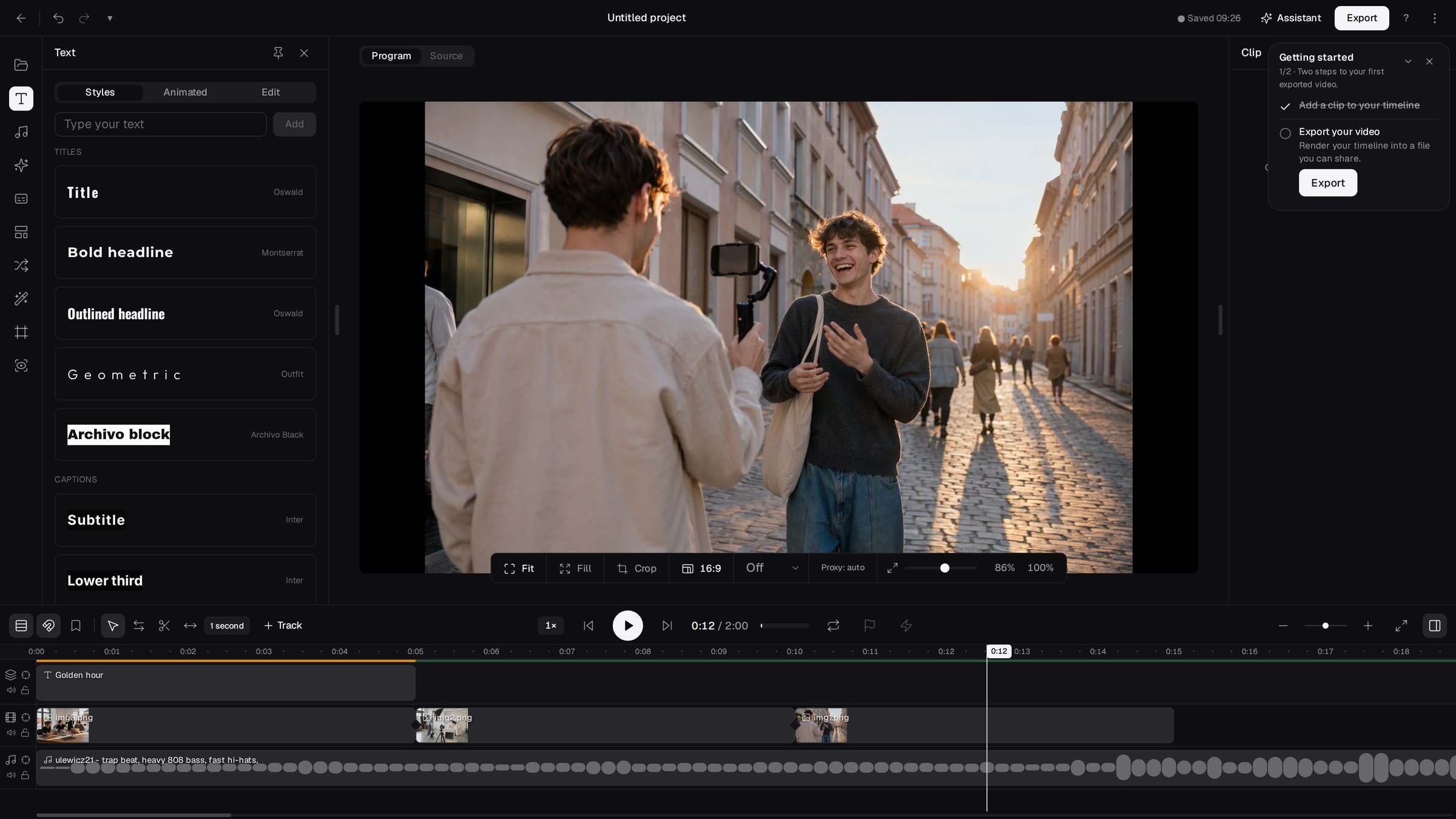
Captions and text
Text was the biggest pain in the old editor, so it got the most work.
- Automatic captions. The editor turns speech in a clip into time-synced captions, and you only fix the odd word.
- 12 caption styles: modern, classic, cinema, karaoke, boxed, neon glow, highlight, outline pop, minimal lower third, comic, word pop and retro. The styles use eight typefaces.
- Full control over the look: font, size, colour, line height and alignment.
- Text like any other element: move it, scale it and animate it with keyframes.
Most importantly, the export reproduces those settings faithfully. If a title sits in the top left with tight line spacing, that is where it sits in the finished file.
!Caption styles in the FOTOhub video editor
Audio
- Separate tracks for music, voiceover and clip sound, all exported together.
- Mixing: volume per track and per clip, with smooth fades in and out.
- Music and sound effect library available right inside the editor.
- Voiceover recording from your microphone straight onto the timeline.
- Music and sound effects generated in the editor. Describe what you need, for example "calm piano bed, 30 seconds" or "a door slamming shut", and the result lands on an audio track. There are several music models and two sound effect models to choose from.
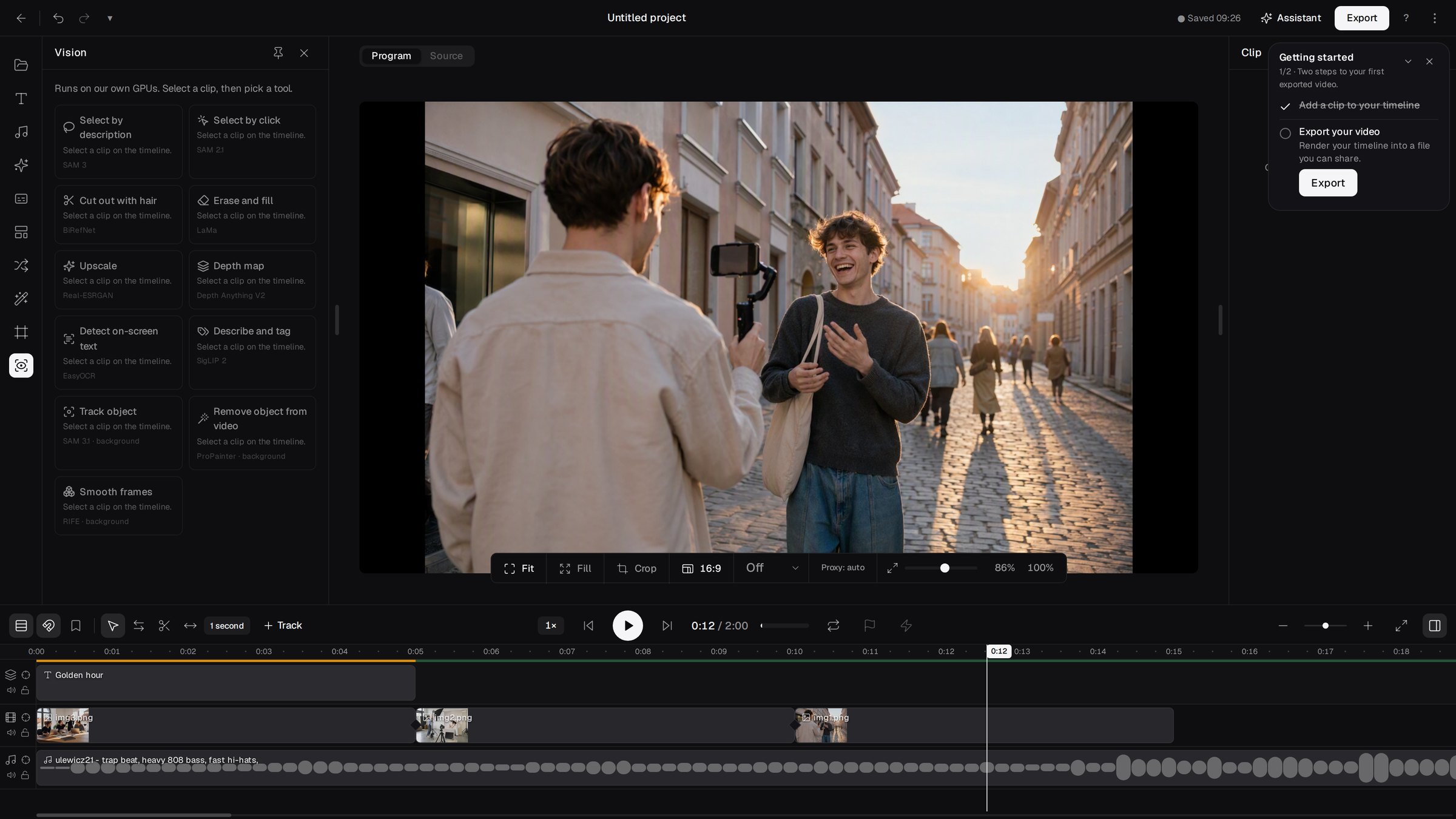
AI right on the canvas
A classic editor cannot do this without extra plugins, separate programs and exporting footage back and forth.
- Select with a click or a box. Click a person, a product or a car in the frame and the editor selects exactly that object, including difficult edges like hair.
- Select with words. If it is easier to type "red mug on the table" than to hit it with the mouse, describe the object and the editor finds it.
- Tracking through the whole clip. Select the object once and the model follows it frame by frame, including when it moves.
- Remove from the clip. A stray passer-by, a cable, a logo on a T-shirt: once selected, the model removes the object from the entire shot and fills the space as if nothing had been there.
- Remove the background. Separate a person from the background to place them on a different scene, a flat colour or a generated backdrop.
Under the hood run the latest segmentation and image reconstruction models, on our own graphics card fleet. Everything happens on the material in your project. Nothing to download, send to another service or bring back into the editor.
!The AI tools panel in the FOTOhub video editor
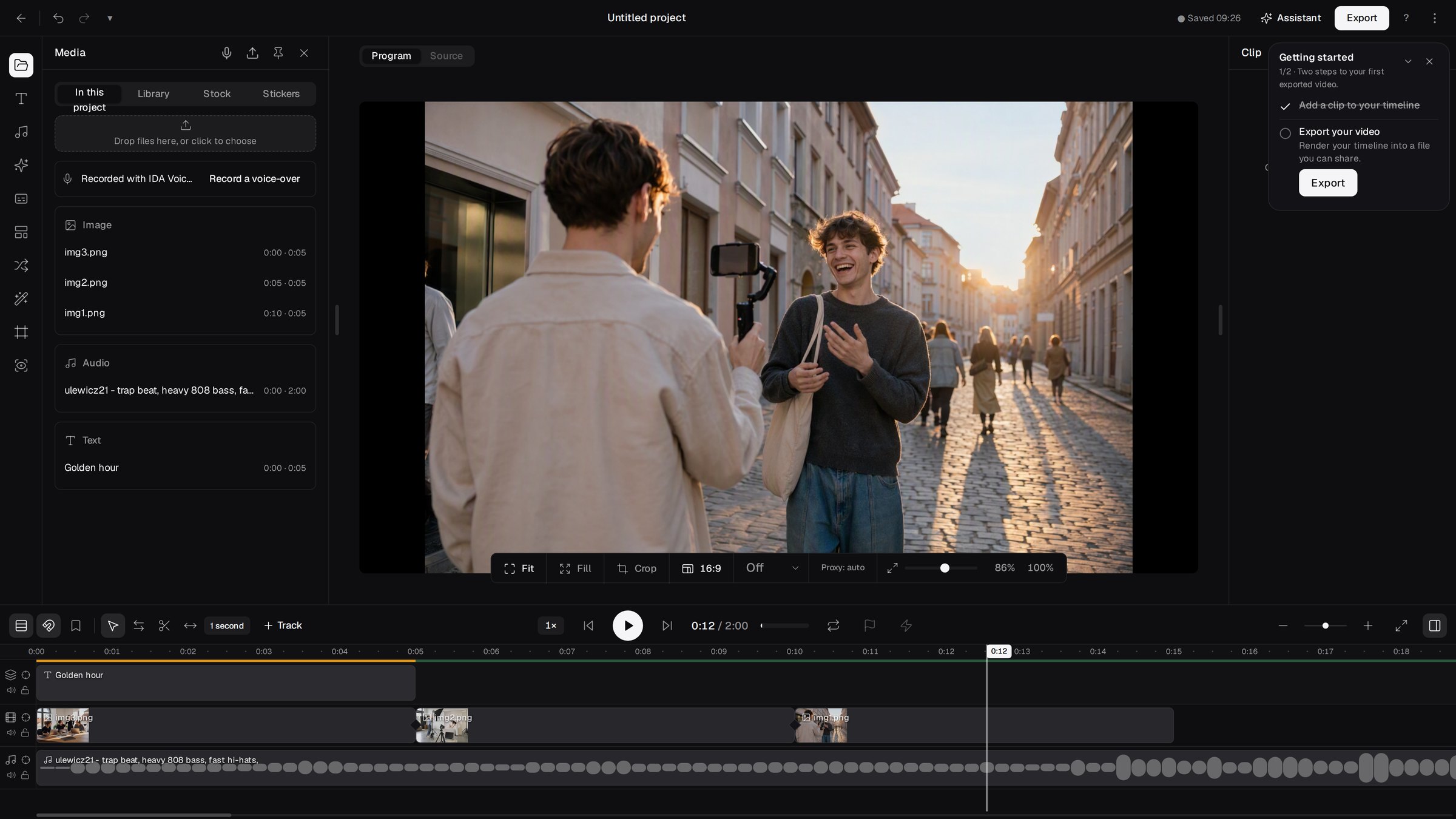
Every source on one timeline
The editor is part of FOTOhub rather than a separate program, and it shows at import. Onto the timeline go:
- files uploaded from your disk, including ones dragged straight into the window,
- material from your FOTOhub library,
- images and video generated in FOTOhub with any of our models,
- shots from the stock footage library.
In practice that means one continuous workflow. Generate a few video shots, add a product photo, generate music, add automatic captions, remove a stray passer-by from one shot and export. All in one browser tab and one account.
!The media panel and timeline in the FOTOhub video editor
Export
The finished film is rendered by our servers, not your computer, so a modest laptop does not slow the export down.
- Resolutions: 720p, 1080p, 2K and 4K.
- Platform presets: TikTok, Instagram Reels, YouTube Shorts, YouTube and X, each with the right resolution, frame rate and quality.
- Estimated file size shown before the export starts.
- Result in your library, ready to download or use in the next project.
Everyday comfort
- Cloud autosave. The project saves itself, and when you work in several tabs the editor makes sure one version never overwrites another.
- Keyboard shortcuts for cutting, playback, selection and navigation, with a cheat sheet built into the app.
- Three interface languages: English, Polish and German, fully translated.
- Runs in the browser on any computer, with nothing to install.
Included in your plan, no meter
Over the past year, the most common request from creators was not to have to count every click. In editing that matters more than anywhere, because the work is trying things: select an object, dislike the result, undo, select differently, export a third version for the client.
So on every paid plan, from Starter up, the editor's AI tools running on our cards and export are included in the price. They use no credits and are not billed per operation. Credits stay where they always were: for generating new material with models, such as a new video shot, an image or a music track.
We can do this because these tools run on our own graphics cards. We do not pay an outside provider per call, so we do not have to pass that cost on to you. A company reselling somebody else's API cannot make this offer. On the free plan the editor is available, and AI tools and export follow that plan's terms.
Who it is for
- Content creators: short formats with automatic captions, music and effects, without switching between five apps.
- Marketing and e-commerce: product films from packshots and generated shots, and ad variants for different formats, vertical included.
- Agencies: many projects and many versions, with AI operations included in the plan, so the budget does not grow with every round of changes.
- People who have never edited video: an interface in three languages, click-to-select instead of masks drawn frame by frame, and everything in the browser.
What is not there yet
We would rather tell you now than have you find out halfway through a project.
- The waveform on audio tracks is illustrative for now and does not precisely reflect the recording.
- Playing a clip in reverse is not yet ready for projects with sound.
- Volume cannot be animated with keyframes yet. Static clip volume and audio fades work.
- One caption line has one colour, and rotated text boxes and italics in some fonts do not reach the export yet.
We are working on each of these and will post when they are ready.
Frequently asked questions
Where do I find the new editor?
In the FOTOhub app, in the video section, or directly at fotohub.app/fh/editor/lite-v2.
Do I need to install anything?
No. The editor runs in the browser and rendering happens on our servers.
Do the editor's AI tools use credits?
Not on paid plans, from Starter up. AI operations on our cards and export are included. Credits are used when generating new material with models.
Will the editor create captions for me?
Yes. Automatic transcription turns speech in a clip into captions, and you then apply one of 12 styles.
What resolution can I export in?
From 720p to 4K, with ready presets for the most popular platforms.
Can I use material generated in FOTOhub?
Yes. Images, video, music and sound effects from FOTOhub go onto the timeline without downloading and re-uploading.
Where is my material processed during AI operations?
Selection, tracking, object removal and background removal run on our graphics card fleet in the United States. The result returns to your project, and project files stay on your account.
What happened to the old editor?
The new editor replaces it. The features creators used have been carried over, with the exceptions listed above.
Open it and see
The best test is your own footage. Open the editor, drop in a few shots, click on an object and see what happens.