Vision API: analyse, segment, read text and track
Describe images, cut objects out with text or clicks, read text, estimate depth, upscale and follow objects through video, with the exact request and response shapes.
What the vision API covers
Vision turns pixels into information or into masks. Most calls take an image_url (a public URL), bill a small fixed amount in USD and answer on the same request. The answer either carries the result inline (labels, boxes, text, base64 masks) or a URL to a finished file.
| Task | Endpoint | Returns |
|---|---|---|
| Describe an image | POST /v1/ai/analyze/image | labels, colours, faces, objects, text, safety flags |
| Find objects by a phrase | POST /v1/vision/segment | a box and a mask for every match |
| Select by clicking | POST /v1/vision/segment-click | one mask from foreground and background points |
| Soft edges for hair and fur | POST /v1/vision/matte | an alpha matte |
| Remove an area | POST /v1/vision/inpaint | the finished image |
| Enlarge | POST /v1/vision/upscale | the enlarged image |
| Depth map | POST /v1/vision/depth | a depth image |
| Read text | POST /v1/vision/ocr | text blocks with positions |
| Score labels you choose | POST /v1/vision/tag | a score per label |
| Video: track, remove, smooth | /v1/vision/track, /remove-object, /interpolate | a job to poll at GET /v1/vision/jobs/{id} |
Every call needs Authorization: Bearer $FOTOHUB_API_KEY and goes to https://apis.fotohub.app. Successful answers share a tail: cost_usd, currency, a billing block and, on the vision routes, processing_time_ms. Inputs are public URLs; outputs are inline data, file links or a job id.
Which route do I need
| You want to | Use |
|---|---|
| File or search photos by content | POST /v1/ai/analyze/image |
| Rank a fixed list of labels you chose | POST /v1/vision/tag |
| Cut out something you can name | POST /v1/vision/segment |
| Cut out what a user pointed at | POST /v1/vision/segment-click |
| Keep hair and fur soft | POST /v1/vision/matte |
| Take the main subject out in one step | POST /v1/images/remove-background |
| Delete an object and repaint | POST /v1/vision/inpaint |
| Read text from a photo | POST /v1/vision/ocr |
| Read a PDF, a form or a receipt | /v1/ai/document/* |
| Anything on a video | /v1/vision/track, /remove-object, /interpolate |
Your first call, step by step
- Pick an image the internet can reach FOTOhub downloads the image itself, so
image_urlmust be a publichttpsaddress. A link behind a login, alocalhostURL or a private network address is refused before any charge. - Send the request with your key Every route here is a
POSTwith a JSON body andAuthorization: Bearer $FOTOHUB_API_KEY, except the job status, which is aGET. The snippet above shows analyse, segment and tag against the same fashion photo. - Read the cost in the answer Every answer ends with
cost_usd,currency, abillingblock with your remainingbalance_usd, and on the vision routesprocessing_time_ms. Log these three; they are your audit trail.
Price shows up in four places: GET /v1/models, GET /v1/pricing, a quote from POST /v1/billing/estimate before you spend, and the cost_usd of the response itself. The figures in this guide are examples from real calls, not a price list.
Analyse an image
POST /v1/ai/analyze/image takes image_url and a list of features: labels, objects, faces, nsfw, ocr and colors. The default is labels and objects. An unknown feature name is a 400 that lists the allowed ones, so a typo never costs money. Optional: language for text, max_labels (1 to 50) and min_confidence (0 to 1).
SRC="https://static.fotohub.app/home/hero/fashion-coral-photo-520.webp"

# Labels and dominant colours.
curl -s -X POST https://apis.fotohub.app/v1/ai/analyze/image \
  -H "Authorization: Bearer $FOTOHUB_API_KEY" -H "Content-Type: application/json" \
  -d "{\"image_url\": \"$SRC\", \"features\": [\"labels\", \"colors\"]}" \
  | jq '{cost_usd, labels: [.labels[] | .name], dominant: .colors.dominant[0].hex}'

# Find every object that matches a phrase, with a box and a mask each.
curl -s -X POST https://apis.fotohub.app/v1/vision/segment \
  -H "Authorization: Bearer $FOTOHUB_API_KEY" -H "Content-Type: application/json" \
  -d "{\"image_url\": \"$SRC\", \"prompt\": \"coat\"}" | tee segment.json \
  | jq '{count, cost_usd, objects: [.objects[] | {score, box}]}'

# The mask of the first match is a grayscale PNG inside the JSON: decode it to a file.
jq -r '.objects[0].mask_png_base64' segment.json | base64 -d > coat-mask.png
file coat-mask.png

# Zero-shot tags: how well does each label fit?
curl -s -X POST https://apis.fotohub.app/v1/vision/tag \
  -H "Authorization: Bearer $FOTOHUB_API_KEY" -H "Content-Type: application/json" \
  -d "{\"image_url\": \"$SRC\", \"labels\": [\"coat\", \"dress\", \"street\"]}" | jq '{labels, cost_usd}'
{
"cost_usd": 0.003,
"features_analyzed": ["labels", "colors"],
"auto_tags": ["winter", "hood", "freezing", "walking", "parka"],
"labels": [
{ "name": "winter", "confidence": 0.785 },
{ "name": "hood", "confidence": 0.752 }
],
"colors": { "dominant": [{ "hex": "#ce554b", "score": 0.237, "percentage": 3.1 }] }
}A real analyse answer, trimmed. The call cost a fraction of a cent.
auto_tags is a ready list of the strongest labels, handy for filing a photo. Label names are always English. Each requested feature adds its own key to the answer, and only the features you asked for appear in features_analyzed:
| Feature | Key in the answer | What it holds |
|---|---|---|
labels | labels | name and confidence, strongest first |
objects | objects | name, confidence and a bounding_box for each object |
faces | faces | A bounding_box, a confidence and likelihood buckets for joy, sorrow, anger, surprise, headwear and blur. No age and no gender. |
nsfw | nsfw | is_safe plus likelihoods for adult, violence, racy, medical and spoof |
ocr | ocr | text as one string and blocks with a box each |
colors | colors | dominant: hex, score and percentage |
Four more names are accepted: landmarks, logos, text (an alias of ocr) and safe_search (an alias of nsfw). The 400 for an unknown name lists the full set.
Retrying without paying twice
Send the same X-Idempotency-Key on a retry and the API answers with the first result instead of running and charging again. A replay carries the header Idempotent-Replay: true. A key is remembered for 24 hours. If the first call is still running you get a 409; if you reuse a key with a different body you get a 422, never a silent first result. Generate one fresh key per logical request, for example a UUID, and keep it across retries.
SRC="https://static.fotohub.app/home/hero/fashion-coral-photo-520.webp"
KEY=$(uuidgen)

# Run it twice with the same key: the second call is a replay and is not charged.
for i in 1 2; do
  curl -si -X POST https://apis.fotohub.app/v1/ai/analyze/image \
    -H "Authorization: Bearer $FOTOHUB_API_KEY" \
    -H "X-Idempotency-Key: $KEY" -H "Content-Type: application/json" \
    -d "{\"image_url\": \"$SRC\", \"features\": [\"labels\"]}" \
    | grep -iE "^HTTP|^idempotent-replay"
done
The replay header is how you tell a cached answer from a new run.
Tag a product photo for a catalogue
Goal. Get search keywords and the main colour of a photo in one request.
Input you can copy.
`features: ["labels", "colors"]` on the fashion photo.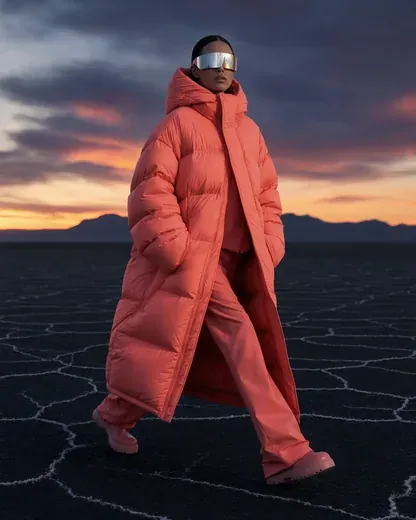
Why it works. The call returned five auto_tags (winter, hood, freezing, walking, parka), the top label winter at 0.785 confidence, and a dominant colour of #ce554b. It cost 0.003 USD in this real call. Store auto_tags as your search index and the first colour as a swatch. Labels describe the scene, not the garment alone, so treat them as search hints and keep a human-written title next to them.
Segmentation and masks
Find objects by a phrase
segment takes a short noun phrase in prompt (up to 120 characters, for example coat or person in red), a min_score (0 to 1, default 0.4) and max_objects (1 to 200). Each match carries a score, a box ([x1, y1, x2, y2] in pixels) and a mask_png_base64: a grayscale PNG the size of the image, white where the object is. An empty list is a valid answer meaning the phrase was not found, and image_size gives the dimensions.
Write the prompt in English as a plain noun with at most a colour or a position: coat, red bag, person on the left. A phrase that is a whole sentence matches worse than the object name. Lower min_score to catch faint matches, raise it to drop doubtful ones, and set max_objects to what your interface can show.
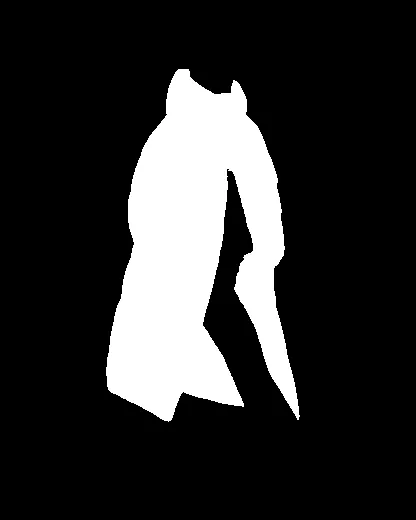
coat: white is the coat.Turn the base64 mask into a file
The mask is an ordinary 8-bit grayscale PNG, base64-encoded. Decoding needs nothing but the standard library:
import base64
import json

body = json.load(open("segment.json"))      # the saved /v1/vision/segment answer
best = max(body["objects"], key=lambda o: o["score"])

with open("coat-mask.png", "wb") as f:
    f.write(base64.b64decode(best["mask_png_base64"]))

print(best["score"], best["box"], body["image_size"])
Pick the highest score, write the PNG, no imaging library needed.
To cut the object out, use the mask as the alpha channel of the original with Pillow. Resize the mask only if its size differs from the photo you downloaded:
import base64
import io
import json

import requests
from PIL import Image

URL = "https://static.fotohub.app/home/hero/fashion-coral-photo-520.webp"
body = json.load(open("segment.json"))
best = max(body["objects"], key=lambda o: o["score"])

photo = Image.open(io.BytesIO(requests.get(URL, timeout=30).content)).convert("RGB")
mask = Image.open(io.BytesIO(base64.b64decode(best["mask_png_base64"]))).convert("L")
if mask.size != photo.size:
    mask = mask.resize(photo.size)

photo.putalpha(mask)                        # white = opaque, black = transparent
photo.save("coat-cutout.png")
A transparent cut-out of the coat. Needs pip install pillow requests.
Cut a coat out of a street photo
Goal. Get a mask of just the coat to recolour it in your own editor.
Input you can copy.
`prompt: "coat"` on a 416 by 520 fashion photo.Why it works. One match came back with a score of 0.91, a box of roughly 105, 67, 300, 423 and a 416 by 520 grayscale mask. Decoding the base64 gives a PNG you can use as an alpha channel or pass as mask_url to the editing calls. This real call cost about 0.11 USD and took 34 seconds, so budget for a slow first request when you set your client timeout.
Select by clicking
segment-click takes points, each with x and y as fractions from 0 to 1 and a label (1 for foreground, 0 for background), up to 32 points. It returns one mask_png_base64, a score and image_size. Use it behind a click-to-select UI.
The two routes combine well. Let segment find a candidate from a phrase, then let the user correct it with clicks. Convert pixel coordinates to fractions by dividing by the image size: a click at pixel 203, 245 on a 416 by 520 image is x = 0.488, y = 0.471. A foreground point inside the object adds to the mask, a background point (label: 0) outside it trims the mask back.
{
  "image_url": "https://static.fotohub.app/home/hero/fashion-coral-photo-520.webp",
  "points": [
    { "x": 0.488, "y": 0.471, "label": 1 },
    { "x": 0.12, "y": 0.5, "label": 0 }
  ]
}
A request body for POST /v1/vision/segment-click: one click on the coat, one on the empty area to its left.
Matte, inpaint, upscale, depth
mattereturnsalpha_png_base64, a soft alpha mask for hair and fur where a hard mask fails.inpainttakesimage_urlandmask_url(a PNG whose white area is removed and repainted) and returns anoutput_url. The mask is passed by URL, so host a mask you made yourself first;segmentreturns base64, not a URL.upscaletakesvariantx2,x4orgeneral(gentler for graphics and text) andqualitystandardorpro; pro is a 4K service for the Professional plan, with its own price and limits.depthreturns anoutput_urlto a depth image, useful for parallax and lighting that follows the scene. The relatedPOST /v1/images/depth-mapacceptsoutput_typegrayscaleorcolored;rawis refused with a 400 before anything is charged.ocrreturnstext,blocksandcount.tagtakeslabels(1 to 100 words) and returns ascorefor each, sorted from best to worst, a quick zero-shot classifier. Scores are small numbers, so compare them against each other rather than against a fixed threshold.
Score your own labels with tag
Goal. Decide which of three categories a photo belongs to.
Input you can copy.
`labels: ["coat", "dress", "street"]` on the fashion photo.Why it works. The real answer ranked coat at 0.0088, dress at 0.0001 and street at 0. None of the numbers is near 1, yet the ranking is clear: coat wins by two orders of magnitude. Pick the top label, or require it to beat the runner-up by a factor you choose, rather than comparing to 0.5. This call cost about 0.05 USD and took 13 seconds.
Read text from a photo that has none
Goal. Know what an OCR call returns when nothing is written in the image.
Input you can copy.
`POST /v1/vision/ocr` with the fashion photo and the default `mode`.Why it works. The real answer was blocks: [], count: 0, text: "", image_size: [416, 520] and mode: "text". That is a successful, billed run, about 0.01 USD in this call, not an error. Check count before you use text, and send image_url as a public address or as a data:image/...;base64 string. The document mode, which returns reading-order text without boxes, is access-gated and can be refused for an account that does not have it.
Video: track, remove, smooth
Three routes work on video and run as jobs. track follows up to 8 phrases through a clip (video_url, prompts, start_frame, max_frames up to 3000, min_score). remove-object erases an object using per-frame masks (masks_url, a ZIP of PNGs) or, with version: "v2" on the Professional plan, one static_mask_url for every frame with a frame window (start_frame, end_frame) and dilation (0 to 24 pixels). interpolate multiplies the frame count by multi (2 to 8) for smoother motion.
- Submit, then poll
GET /v1/vision/jobs/{job_id}. Polling is free. - If the engine fails after the charge, you get a
424that says you were not charged. If a poll itself fails, you get a502,503or504: just retry the poll. - A job id belongs to the account that submitted it; another account gets a
404.
| Poll answer | Meaning | What you do |
|---|---|---|
status other than done or failed, with progress | Still running | Wait a few seconds and poll again |
done with output_url and expires_in | A finished video; the link is signed and lasts 3600 seconds | Download it now and keep your own copy |
done with frames, detected, frame_count | The result of track: the masks come back in the body | Read them straight away; there is no file |
failed with refunded | The job did not produce a result; refunded says whether the charge was returned | Do not poll again; resubmit if you still need it |
import os
import time

import requests

BASE = "https://apis.fotohub.app"
HEAD = {"Authorization": f"Bearer {os.environ['FOTOHUB_API_KEY']}"}


def wait_for_job(job_id, every=5, limit=900):
    """Poll a vision job until it is done or failed. Polling costs nothing."""
    waited = 0
    while waited < limit:
        r = requests.get(f"{BASE}/v1/vision/jobs/{job_id}", headers=HEAD, timeout=30)
        if r.status_code not in (502, 503, 504):     # those three mean: ask again
            r.raise_for_status()
            job = r.json()
            if job["status"] in ("done", "failed"):
                return job
        time.sleep(every)
        waited += every
    raise TimeoutError(f"job {job_id} did not finish in {limit} s")
A polling loop that retries the retryable statuses and stops on a terminal one.
Documents, files and limits
- The document routes (
/v1/ai/document/detect-text,/analyze,/analyze-expense) take a base64documentand power the Document Intelligence page. At the time of writing they accept the signed-in web session but answer401 Invalid or expired tokento an API key, so they are not part of the key-based API yet. See the Document Intelligence guide for the page itself. - Behind those routes: PDF, JPEG, PNG and TIFF up to 10 MB, and for
analyzethe featuresTABLES,FORMS,SIGNATURESandLAYOUT. Do not plan an integration on them until key access is announced. - Inputs are fetched by FOTOhub, so
image_urlmust be reachable from the internet. Private or internal addresses are refused before anything is charged, with a 400 whose body names the field and sayscharged: false. - Results that are files (
output_url) from images are publicly readable links with random names. Copy sensitive results to your own storage. Video results are signed links that expire after an hour. - Prices differ by operation and can change. Read them from
GET /v1/pricingor quote withPOST /v1/billing/estimate; the exact charge is always in the response.
Errors and what to do
| Status | When | What to do |
|---|---|---|
| 400 | A bad URL (private or not https), an unknown features name, an unreadable image. The text says your wallet was not charged. | Fix the input and send it again. Nothing was spent. |
| 401 | A bad key, or a document route called with an API key | Check the key; document routes need a web session |
| 409 / 422 | An idempotency key whose first call is still running (409), or reused with a different body (422). Body validation also answers 422, for example a prompt over 120 characters or more than 32 points. | Wait and retry with the same key, or use a new key for a new body |
| 413 | OCR can refuse an image larger than 25 MB | Downscale the image first |
| 424 | The engine failed after the charge. The message states you were not charged. | Retry after a short pause; no money is lost |
| 429 | OCR document mode is busy; the answer carries Retry-After | Wait for the given number of seconds |
| 404 / 410 | A job id that is not yours or does not exist (404); a finished result that was already collected and has expired (410) | Check the id and the account; resubmit after a 410 |
| 502 / 503 / 504 | A job poll could not reach the engine or the job registry | Poll again; polling is free and the job is not affected |
{
  "error": "url_blocked",
  "field": "image_url",
  "charged": false,
  "message": "image_url must be a public https URL. Your wallet was not charged for this request."
}
The shape of the 400 for an address FOTOhub refuses to fetch. The detail key wraps it in the HTTP answer.
For the general error envelope, rate limits and the exact wording of wallet errors, read the errors and limits guide. Webhooks can tell you when a vision call finishes without polling; see the webhooks guide.
Production checklist
- Keep the key on your server. A browser that holds it can spend your wallet.
- Set client timeouts of two minutes or more on synchronous vision routes, and 30 seconds on job polls.
- Send an
X-Idempotency-Keyonanalyze, and keep onejob_idper submitted video job so you never submit twice. - Log
cost_usd,processing_time_msand thex-request-idheader of every call, so a support question has an exact reference. - Download and store results you need to keep: image files are public links, video links expire after an hour.
- Do not describe these routes to your own users as EU-only processing. Re-read the note near the top of this guide.
Troubleshooting and questions
- How do I turn a mask into a cut-out?
- Decode
mask_png_base64, use it as the alpha channel of your original with any imaging library, or send it asmask_urlto an editing call that accepts one. The Pillow snippet above does exactly this in four lines. - Why is
taggiving tiny scores? - It scores each label independently as a similarity, not a probability that sums to one. Rank the labels; do not expect 0.9 for the right one.
- A route answered 404 for my job id.
- Job ids are private to the account. Check you poll with the same account and key owner that submitted it.
segmentreturned an emptyobjectslist. Was I charged?- An empty list is a normal, completed answer, so it is billed like any other run. Try a simpler noun, lower
min_score, or check the image actually contains the object. - My signed or storage URL is refused.
- The address must be reachable from the public internet over https and must not have expired. A link that needs cookies or a VPN fails, and so does
http://localhost.
Continue in the images guide for background removal and generation, the video guide for generated clips, and the errors and limits guide for rate limits and the full error format.