Image API: generate, edit and cut out
Generate images with synchronous and asynchronous models, edit them with instructions, and run background removal and replacement, with real requests, responses and polling.
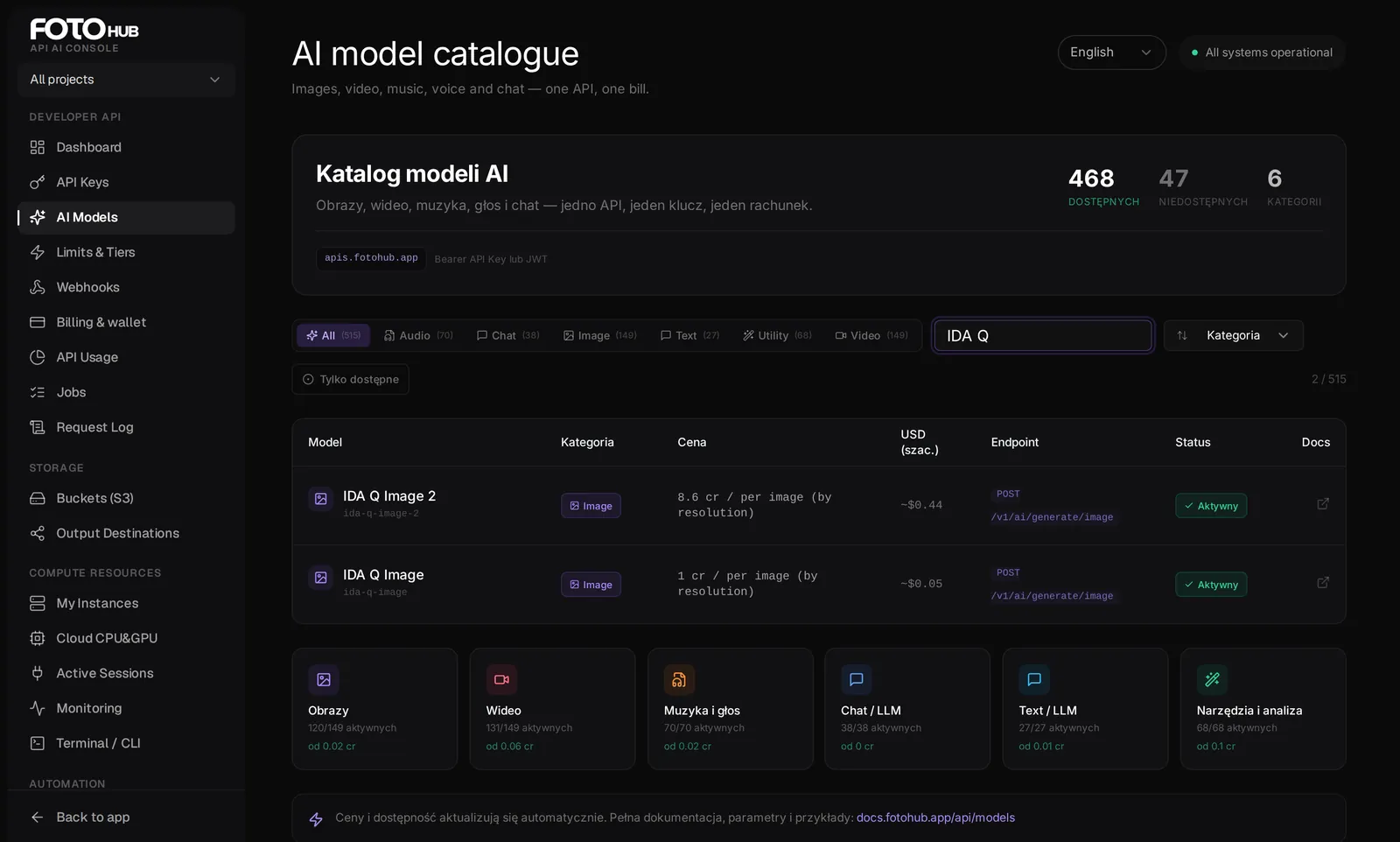
The image API at a glance
There are four families, and which one you need decides whether you get an answer right away or a job to poll.
| Family | Endpoint | Shape |
|---|---|---|
| Generate from text | POST /v1/ai/generate/image | Synchronous for most models; asynchronous (202 and a poll URL) for the IDA Q models |
| Edit by instruction | POST /v1/images/instruct-edit, /extend, /variations | Asynchronous, poll /v1/images/edit-jobs/{id} |
| Background and finishing | POST /v1/images/remove-background, /replace-background, /blur-background, /add-shadow, /enhance, /denoise ... | Synchronous, returns an output URL |
| Advanced tools | GET /stability/tools, POST /stability/{tool} | Synchronous, base64 image in the body |
Every call is billed in USD from your wallet before the work starts and refunded automatically if the job fails. The cost of the exact call is in its response (cost_usd), and the price of any model is in GET /v1/models and GET /v1/pricing. A key needs the Images scope.
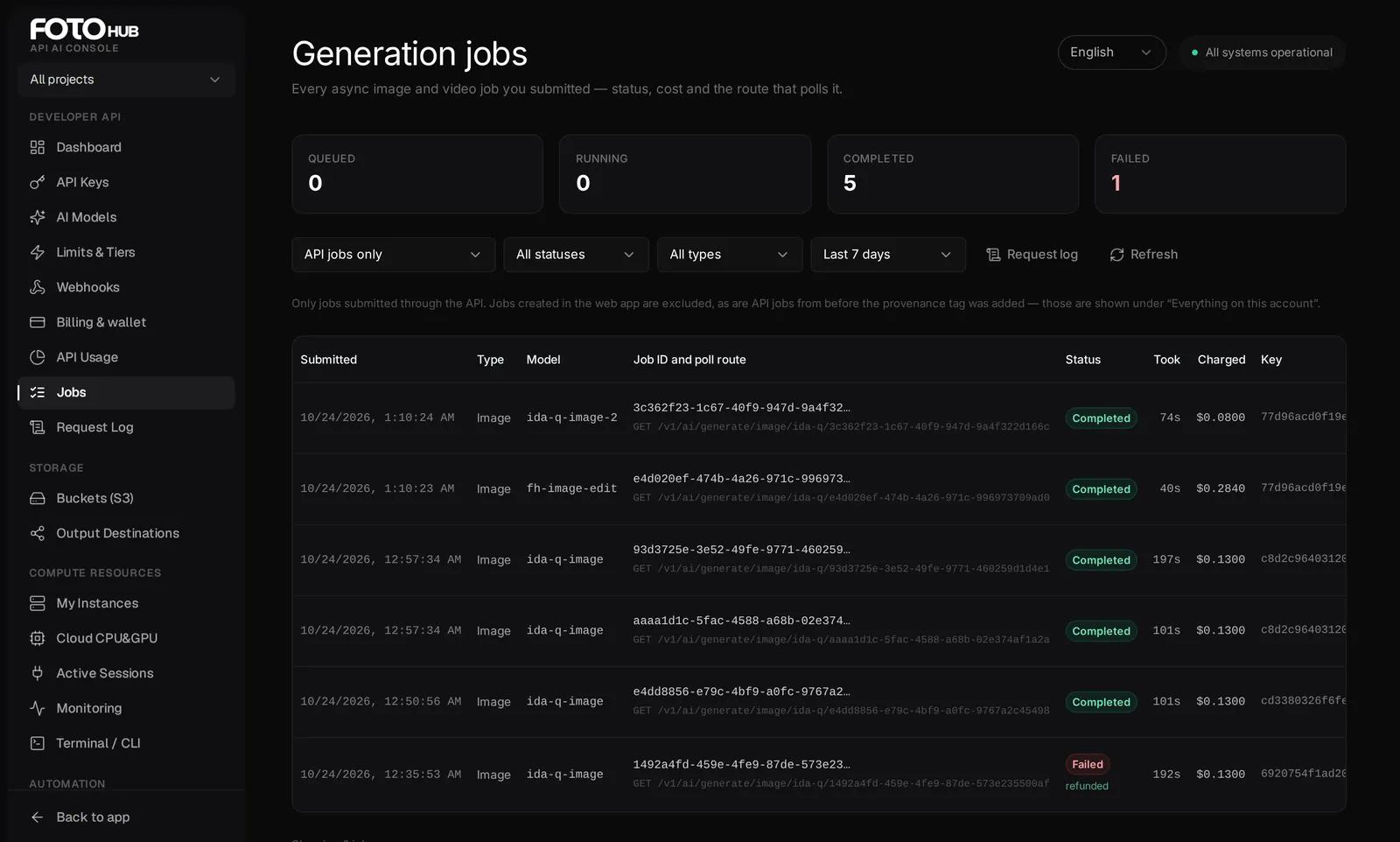
Choose the right route
| You want to | Use | Why |
|---|---|---|
| Make a new picture and get it in one request | POST /v1/ai/generate/image + a synchronous model | Nothing to track: the response holds the link and the price. |
| Pick a size tier and a speed preset, get transparency, or place text at exact coordinates | ida-q-image-2 | It adds size_tier, preset, transparent, palette and layout. |
| Change a photo you already have: a colour, an object, a style | /v1/images/instruct-edit | One written instruction, with an optional mask or style reference. |
| More canvas around a photo, or alternative takes | /v1/images/extend, /v1/images/variations | Outpainting, or 1 to 4 fresh compositions of the same subject. |
| Change only the background | /v1/images/remove-background, /replace-background, /blur-background | Synchronous, single purpose, one output_url back. |
| Upscale, erase an object with a mask, search and replace, sketch control | POST /stability/{tool} | Thirteen tools, each with its own price per image. |
Generate an image
Choose a model from the catalogue, then send the prompt. A synchronous model keeps the connection open and answers when the image is done, usually in 10 to 40 seconds.
curl -s -X POST https://apis.fotohub.app/v1/ai/generate/image \
  -H "Authorization: Bearer $FOTOHUB_API_KEY" \
  -H "Content-Type: application/json" \
  -d '{
    "model": "seedream-5-0-260128",
    "prompt": "a single green apple on a white studio backdrop, soft light",
    "aspect_ratio": "1:1"
}' | jq '{model, cost_usd, balance: .billing.balance_usd, url: .images[0].url}'| Field | Notes |
|---|---|
prompt | Required. A missing prompt is a 400 and costs nothing. |
model | An id from GET /v1/models?category=image. Check is_active. |
aspect_ratio | 1:1, 16:9, 9:16, 4:3, 3:4, and for some models more |
width, height, image_size | Pixel size, or a tier such as 1K, 2K, 4K. The platform caps the tier to what the model really renders and charges for that, never for more. Valid tiers are 1K, 1.5K, 2K, 3K and 4K; any other value is a 400. |
num_images | How many images. You are charged up front and refunded for any the provider does not deliver. |
negative_prompt, style, seed | Optional. Honoured by the models that support them. |
output | Deliver straight to one of your own buckets for this one request. See the API keys guide for routing. |
The answer contains an images array of objects with a signed url, plus cost_usd, a billing block with your balance after the charge, and usage with the real output size (usage.resolution, for example 2048x2048) and timings.
What a synchronous answer looks like
{
  "model": "seedream-5-0-260128",
  "cost_usd": 0.0315,
  "currency": "USD",
  "billing": { "method": "wallet", "cost_usd": 0.0315, "balance_usd": 82.0132, "currency": "USD" },
  "usage": { "generated_images": 1, "resolution": "2048x2048", "generation_ms": 22119, "transfer_ms": 2058 },
  "images": [
    {
      "id": "...",
      "url": "https://s1.fotohub.app/storage/v1/object/sign/api-generations/.../ai-gen-....png?token=...",
      "thumbnail_url": "..."
    }
  ]
}
A real response from the first-image call, trimmed. The image record has more fields (tags, colours, sizes) that you can ignore.
- Download
images[0].urlright away; it is a signed link. - Log
cost_usdandbilling.balance_usdnext to your own record id. That is your reconciliation trail.
IDA Q: FOTOhub's own image models
IDA Q runs on GPUs that FOTOhub operates in Switzerland, outside the EU, so requests go through a queue and the models are asynchronous. The submit answers 202 with a job_id, a queue_position, the estimated seconds and a poll_url. The charge is taken then, and a job that fails is refunded and says so.
IDA Q (ida-q-image)
# 1. Submit: 202 with a job_id and a poll_url. The charge is taken now.
JOB=$(curl -s -X POST https://apis.fotohub.app/v1/ai/generate/image \
  -H "Authorization: Bearer $FOTOHUB_API_KEY" \
  -H "Content-Type: application/json" \
  -d '{
    "model": "ida-q-image",
    "prompt": "a ceramic coffee mug on a wooden table, warm morning light, shallow depth of field",
    "aspect_ratio": "4:3",
    "image_size": "1K"
  }')
POLL=$(echo "$JOB" | jq -r .poll_url)
echo "$JOB" | jq '{job_id, status, estimated_seconds, cost_usd}'

# 2. Poll until it is completed or failed. Polling is free.
while true; do
  R=$(curl -s "$POLL" -H "Authorization: Bearer $FOTOHUB_API_KEY")
  STATUS=$(echo "$R" | jq -r .status)
  echo "$STATUS $(echo "$R" | jq -r '.progress // empty')"
  [ "$STATUS" = "completed" ] || [ "$STATUS" = "failed" ] && break
  sleep 5
done
echo "$R" | tee result.json | jq '{status, images, error, refunded}'
{
"job_id": "e4dd8856-e79c-4bf9-a0fc-9767a2c45498",
"status": "completed",
"progress": 100,
"images": ["https://s1.fotohub.app/storage/v1/object/sign/api-generations/ida-q2/.../0.png?token=..."],
"result": { "seed": 1157813605, "width": 1168, "height": 880, "num_images": 1, "has_alpha": false },
"billing": { "cost_usd": 0.13, "refunded": false }
}A completed IDA Q job. The images list holds plain signed URLs, and result has the real size and seed.
- Statuses:
queued,processing(withprogress),completed,failed. image_sizeselects a size tier (1Kis the default and the cheapest); larger tiers cost more and take longer. Read the tier prices fromGET /v1/pricing.- A prompt in any language is accepted and restructured for the model.
- A job can fail with an empty-output error. It is refunded automatically; submit again.
- The prompt can be up to 6,000 characters.
image_sizeaccepts1K,1.5Kand2Kfor this model; they are reported asstandard,hdandultrain theresolutionfield and take roughly 1.5, 3 and 7 minutes. num_imagesis clamped, not rejected: at1Ka job renders up to 2 images, above that 1. A ratio the model does not render at the tier you asked for is moved to the nearest tier it does, and you are charged for what is delivered.
A product still life with IDA Q
Goal. Get a first image from the asynchronous model and see what the job reports along the way.
Input you can copy.
Prompt: a ceramic coffee mug on a wooden table, warm morning light, shallow depth of field. `model` `ida-q-image`, `aspect_ratio` `4:3`, `image_size` `1K`.
Why it works. In our run the submit answered 202 with estimated_seconds 83 and a charge of 0.13 USD, the polls showed processing with a rising progress, and the finished job reported a 1168 by 880 image and its seed.
IDA Q Image 2 (ida-q-image-2)
The second generation is always asynchronous and adds controls: size_tier (1K, HD, FULL), preset (fast, balanced, max), transparent for an alpha channel, a palette, and a layout of up to 12 entries that place objects or text boxes by pixel coordinates inside the output. An invalid layout is a 422 and nothing is charged. It polls on its own route.
# IDA Q Image 2: always asynchronous, with size tiers and presets.
JOB=$(curl -s -X POST https://apis.fotohub.app/v1/ai/generate/image \
  -H "Authorization: Bearer $FOTOHUB_API_KEY" \
  -H "Content-Type: application/json" \
  -d '{
    "model": "ida-q-image-2",
    "prompt": "a ceramic coffee mug on a wooden table, warm morning light",
    "aspect_ratio": "4:3",
    "size_tier": "1K",
    "preset": "fast"
  }')
echo "$JOB" | jq '{job_id, status, size_tier, preset, cost_usd, estimated_seconds}'

POLL=$(echo "$JOB" | jq -r .poll_url)
until [ "$(curl -s "$POLL" -H "Authorization: Bearer $FOTOHUB_API_KEY" | tee poll.json | jq -r .status)" != "processing" ] \
   && [ "$(jq -r .status poll.json)" != "queued" ]; do sleep 4; done
jq '{status, images: [.images[] | split("?")[0]], result}' poll.json
The same subject, tuned for speed
Goal. Compare the second generation against the first on one prompt.
Input you can copy.
`model` `ida-q-image-2`, `size_tier` `1K`, `preset` `fast`, `aspect_ratio` `4:3`, the same mug prompt without the depth-of-field phrase.
Why it works. The submit echoed size_tier, preset and aspect_ratio, quoted estimated_seconds 50 and charged 0.08 USD; the image came back at the same 1168 by 880. Poll the route in poll_url, which for this model ends in /ida-q-image-2/{job_id}.
| Tier and preset | Size at 1:1 | Estimated seconds per image | Images per job |
|---|---|---|---|
1K fast | 1024 x 1024 | 50 | 4 |
1K balanced | 1024 x 1024 | 83 | 4 |
1K max | 1024 x 1024 | 198 | 1 |
HD fast | 1536 x 1536 | 116 | 2 |
HD balanced | 1536 x 1536 | 192 | 1 |
HD max | 1536 x 1536 | 459 | 1 |
FULL fast | 2048 x 2048 | 249 | 1 |
FULL balanced | 2048 x 2048 | 400 | 1 |
FULL with max is not offered. The pixel size depends on the aspect ratio too: the 4:3 square-ish frame in the example renders 1168 by 880 at 1K, and the very wide or very tall ratios (4:1, 1:4) exist only at 1K. A combination that is not offered is a 422 that says so and charges nothing.
| Extra field | Notes |
|---|---|
num_images | 1 up to the per-job count in the table above, otherwise 422. |
transparent | true or false. Transparent output is priced separately. |
palette | A named palette (ember, fresh, jungle, pastel, mono, neon, earth, ocean) or a list of 1 to 8 colours like #RRGGBB. |
seed | A whole number from 0 to 4294967295 for repeatable results. |
Pin a headline to a poster
Goal. Get an image with a text box exactly where your template needs it.
Input you can copy.
Add `"layout": [{"type": "text", "box": {"x": 80, "y": 60, "w": 860, "h": 160}, "text": "SUMMER SALE"}]` to the body above.Why it works. box is in the pixels of the image this request renders (for example 1024 by 1024 for a 1K square) and must lie inside it; text entries need a text of up to 200 characters and obj entries a desc of up to 500.
Two more FOTOhub image models sit under /v1/images/fh/: list them with GET /v1/images/fh/models (each entry gives its id, region, qualities, aspect ratios, limits and what it supports, such as reference images, transparency or text layout), submit with POST /v1/images/fh/generate and poll GET /v1/images/fh/jobs/{id}.
Edit by instruction
POST /v1/images/instruct-edit changes an existing image from a written instruction. It is asynchronous: you get a job, then poll GET /v1/images/edit-jobs/{id} (its poll_url is relative to the API host) until status is succeeded, failed or cancelled. Cancel a running job with POST /v1/images/edit-jobs/{id}/cancel.
SRC="https://static.fotohub.app/home/hero/fashion-coral-photo-520.webp"

JOB=$(curl -s -X POST https://apis.fotohub.app/v1/images/instruct-edit \
  -H "Authorization: Bearer $FOTOHUB_API_KEY" \
  -H "Content-Type: application/json" \
  -d "{\"image_url\": \"$SRC\", \"prompt\": \"change the coat color to deep green\", \"mode\": \"fast\"}")
echo "$JOB" | jq '{job_id, status, mode, estimate_s, processing_region, cost_usd}'

# poll_url is relative to the API host
POLL="https://apis.fotohub.app$(echo "$JOB" | jq -r .poll_url)"
while true; do
  R=$(curl -s "$POLL" -H "Authorization: Bearer $FOTOHUB_API_KEY")
  STATUS=$(echo "$R" | jq -r .status)
  echo "$STATUS"
  case "$STATUS" in succeeded|failed|cancelled) break;; esac
  sleep 4
done
echo "$R" | tee edit-result.json | jq '{status, images: .result.images}'
{
"job_id": "e4d020ef-...",
"kind": "instruct",
"status": "queued",
"mode": "fast",
"estimate_s": 33,
"poll_url": "/v1/images/edit-jobs/e4d020ef-...",
"processing_region": "us",
"cost_usd": 0.28403,
"currency": "USD",
"queue_position": 1
}The 202 answer of a real fast edit (trimmed). The charge is taken now.
{
  "job_id": "e4d020ef-...",
  "kind": "instruct",
  "status": "succeeded",
  "mode": "fast",
  "processing_region": "us",
  "result": {
    "images": [
      { "url": "https://s1.fotohub.app/storage/v1/object/public/photos/ida-q2/.../0.png", "width": 416, "height": 520 }
    ],
    "count": 1,
    "source_size": { "width": 416, "height": 520 }
  }
}
The same job once finished (trimmed). Between the two, polls showed running with a falling eta_s.
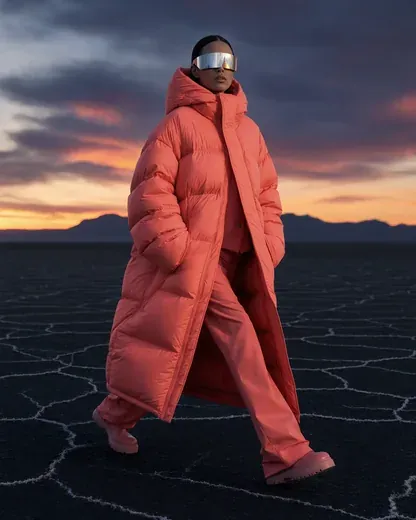
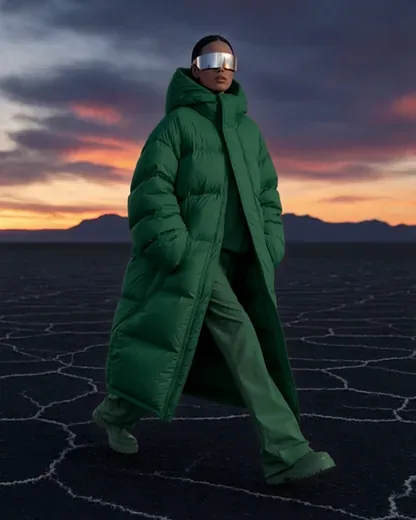
fast.Recolour one garment, keep the rest
Goal. Show the same product photo in a second colourway without a new photoshoot.
Input you can copy.
`image_url` the fashion photo, `prompt` `change the coat color to deep green`, `mode` `fast`.Why it works. The edit took about 40 seconds from acceptance to succeeded, cost 0.28403 USD for a 416 by 520 source, and returned an image of the same size.
The result URL of an edit is a public link with a random name, like the cut-out operations below, so copy the file if the image is sensitive. A finished job stays readable through GET /v1/images/edit-jobs/{id}, and GET /v1/images/edit-jobs lists your recent ones (filter with active, kind and limit up to 50).
| Field | Notes |
|---|---|
image_url | Required. A public https URL or a data:image/...;base64, value, up to 25 MB. |
prompt | What to change (edit), the new colours (recolor) or a style name. Up to 2,000 characters. |
preset | edit (default), recolor or style_transfer. For style transfer pass a reference_url or a style name. |
mode | fast (about 45 seconds) or quality (about 6 minutes, the full model) |
mask_url | Optional PNG mask: white marks where to edit, the rest stays as it is |
seed, client_ref | Reproducibility, and an opaque object (up to 2 KB) echoed back in the job |
POST /v1/images/extendgrows the canvas: giveleft,top,right,bottomin pixels, or a targetcanvassize with anoffset, and an optionalpromptdescribing the new area. It is an outpainting job on the same polling route.POST /v1/images/variationsmakes 1 to 4 variations of an image, with an optionalpromptas direction.POST /v1/ai/edit/imageis a simpler synchronous editor withmodeset toinpaint,outpaint,bgswaporremoveand an optionalmask_url.
Limits and behaviour of edit jobs
qualitymode needs a Professional plan. Without it the call is a 403 withplan_requiredand nothing is charged.fasthas no such gate.extendgrows each side by at most 2,048 pixels, and the finished canvas may not exceed 6144 by 6144 pixels.- Cancelling works only while a job is queued. A running edit cannot be stopped and answers
409withnot_cancellable; it finishes. A cancel of a queued job refunds the charge. - When the image engine is busy the submit answers
429with aRetry-Afterheader and the message says nothing was charged. Wait that many seconds and send the same request again.
Cut-outs, backgrounds and finishing
These operations are the fast path for product photos. They are synchronous, take an image_url (a public URL) and return an output_url. They chain naturally: cut the subject out, put it on a colour, add a shadow.
SRC="https://static.fotohub.app/home/hero/fashion-coral-photo-520.webp"

# 1. Cut the subject out: a transparent PNG.
curl -s -X POST https://apis.fotohub.app/v1/images/remove-background \
  -H "Authorization: Bearer $FOTOHUB_API_KEY" \
  -H "Content-Type: application/json" \
  -d "{\"image_url\": \"$SRC\"}" | tee cutout.json | jq '{output_url, cost_usd, size_bytes}'

# 2. Put the cut-out on a new background colour.
curl -s -X POST https://apis.fotohub.app/v1/images/replace-background \
  -H "Authorization: Bearer $FOTOHUB_API_KEY" \
  -H "Content-Type: application/json" \
-d "{\"image_url\": \"$SRC\", \"background\": \"#f4efe6\"}" | jq '{output_url, transparent_url, background_type, cost_usd}'| Endpoint | What it does and its main fields |
|---|---|
/v1/images/remove-background | Transparent cut-out. output_format: png or webp. |
/v1/images/remove-background/advanced | Guide the cut with click points (label 1 foreground, 0 background), then refine with feather (0 to 20), smooth, shift_edge and decontaminate. |
/v1/images/replace-background | background is a hex colour, a gradient, an image URL or a text prompt; background_type is auto by default. Returns output_url and transparent_url. |
/v1/images/blur-background | Portrait-style blur with blur_radius 1 to 50 and feather. |
/v1/images/add-shadow | Shadow for a transparent PNG: shadow_type natural, drop or contact, plus opacity, offset, blur and colour. |
/v1/images/enhance, /denoise, /colorize, /face-restore, /color-grade, /depth-map | Finishing operations: auto-enhance, denoise, colourise, restore faces, grade, depth map. |
/v1/images/batch | Run an operation over many image_urls in one request; fires an images.batch.completed webhook. |
A product packshot in three calls
Goal. A clean listing image from a snapshot on a messy table.
Input you can copy.
1. `remove-background` on the snapshot gives a transparent PNG.
2. `replace-background` with `background` `#f4efe6` puts it on a warm off-white.
3. `add-shadow` on the transparent PNG (`shadow_type` `natural`) adds a soft contact shadow; composite it on your background.
Why it works. Each step costs a small fixed amount, so the whole chain is cheaper and more predictable than asking a generator to invent the photo again.
Cut a model out of a catalogue photo
Goal. Get a transparent PNG you can place on any page background.
Input you can copy.
`POST /v1/images/remove-background` with the `image_url` of the fashion photo, no other field.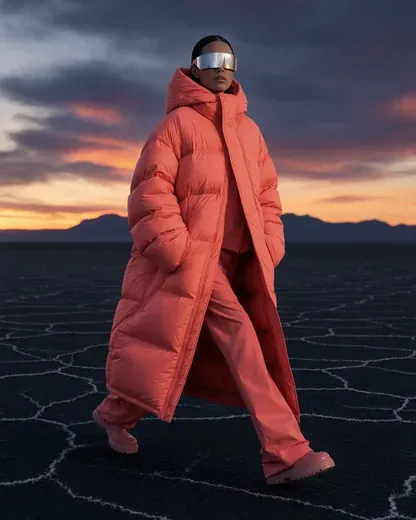
Why it works. The call took about 8 seconds, charged 0.107181 USD and returned an output_url plus size_bytes (242146 here). The chained replace-background call with a hex colour answered in under 3 seconds with output_url, transparent_url and background_type color.
Advanced editing tools
GET /stability/tools lists thirteen tools with their price per image and what each needs (requires_mask, requires_prompt, requires_reference): fast, creative and conservative upscale, background removal, object erase, inpaint, outpaint, search and replace, search and recolour, style transfer, style guide, and sketch or structure control. Call one with POST /stability/{tool_id} and a base64 image (PNG or JPEG, between 4,096 and about 9.4 million pixels).
A retry-safe generation loop
Networks fail between your request and the answer, and a charged call that times out leaves you not knowing whether it ran. Send one X-Idempotency-Key per logical request and reuse the same value for every retry. Within 24 hours the API answers a repeat with the original response and an Idempotent-Replay: true header instead of running and charging again. The header works on the generation and image routes; the API errors and limits guide has the full rules.
import os
import time
import uuid

import requests

API = "https://apis.fotohub.app"
AUTH = {"Authorization": f"Bearer {os.environ['FOTOHUB_API_KEY']}"}


def generate(body, max_wait=600):
    headers = {**AUTH, "X-Idempotency-Key": str(uuid.uuid4())}  # one key, every attempt
    for attempt in range(5):
        r = requests.post(f"{API}/v1/ai/generate/image", json=body, headers=headers, timeout=60)
        if r.status_code in (409, 429, 502, 503, 504):
            time.sleep(int(r.headers.get("Retry-After", 2 ** attempt)))
            continue
        r.raise_for_status()
        break
    else:
        raise RuntimeError("submit kept failing")

    job = r.json()
    if r.status_code != 202:  # synchronous model: this is the final answer
        return [img["url"] for img in job["images"]]

    deadline = time.time() + max_wait
    delay = 3.0
    while time.time() < deadline:
        time.sleep(delay)
        poll = requests.get(job["poll_url"], headers=AUTH, timeout=30)
        poll.raise_for_status()
        state = poll.json()
        if state["status"] == "completed":
            return state["images"]  # IDA models: a list of URLs
        if state["status"] in ("failed", "cancelled"):
            raise RuntimeError(state.get("error", "job failed"))  # state["billing"]["refunded"] says if you got it back
        delay = min(delay * 1.5, 10.0)
    raise TimeoutError(f"job {job['job_id']} still running; keep polling {job['poll_url']}")
Submit, retry safely, then poll. It treats a 200 and a 202 differently because synchronous models answer with the image and IDA models answer with a job.
- A timeout in your own loop is not a failed job. The job keeps running and is charged once; poll its
poll_urllater instead of submitting again. - After a failed job, resubmit on purpose with a new key. The old key would replay the original answer, which points at the same failed job.
Plan the cost
Prices are in USD per request and the wallet is charged when the call is accepted. You can read a price in four places: GET /v1/models (unit price per model), GET /v1/pricing, POST /v1/billing/estimate (a quote for a list of operations) and, for the call you just made, cost_usd in the response.
curl -s -X POST https://apis.fotohub.app/v1/billing/estimate \
  -H "Authorization: Bearer $FOTOHUB_API_KEY" \
  -H "Content-Type: application/json" \
  -d '{"operations": [{"type": "image", "model": "seedream-5-0-260128", "count": 2}]}' \
  | jq '{total_usd, sufficient, balance_usd}'
Quote two synchronous images before you commit. The real answer was a total of 0.063 USD with sufficient true.
For the asynchronous IDA models the figure to rely on is the cost_usd in the 202 answer, which already reflects the tier, preset and transparency you asked for. These are charges from real test calls, shown as examples and not as a price list:
| Call | Example charge (USD) | What it was |
|---|---|---|
| Synchronous image | 0.0315 | one 2048 x 2048 image |
| IDA Q | 0.13 | 1K, 4:3, one image |
| IDA Q Image 2 | 0.08 | 1K, fast, 4:3 |
| Instruction edit | 0.28403 | fast, 416 x 520 source |
remove-background | 0.107181 | one image |
replace-background | 0.214362 | one image, colour background |
- Synchronous models:
num_imagesis charged up front and the difference is refunded if fewer images arrive. The tier is capped to what the model renders, and you pay for that tier. - IDA Q and IDA Q Image 2: the price follows the size tier, and for Image 2 also the preset and
transparent. A failed job is refunded automatically and the poll says so (billing.refunded). - Background operations and advanced tools: a fixed price per call. If the GPU fails, times out or is unavailable (
502,503,504), the charge is refunded before the error reaches you.
Deliver results to your own bucket
By default a generated file stays in FOTOhub's private storage and comes back as a signed link that expires. To keep results in storage you control, route them: set a default destination and per-model rules on the key (see the API keys guide), or override both for one request with an output object in the body.
{
  "model": "seedream-5-0-260128",
  "prompt": "a single green apple on a white studio backdrop, soft light",
  "output": {
    "bucket": "my-assets",
    "prefix": "apples/{date}/{job_id}.{ext}",
    "visibility": "private"
  }
}
bucket is the id or alias of a FOTOhub bucket you own, prefix is a relative path template, visibility is public or private. The names here are placeholders.
- The transfer runs in the background, so a synchronous answer carries a
deliveryblock (routed_by,bucket,region, the plannedkeysandstatuspending) instead of making you guess where the file will land. - A bucket reference that cannot be used does not fail the call, since you have already paid for the image. The output falls back to the next level, ending at FOTOhub storage. Check
delivery.routed_byto see which level won.
Production checklist
- Every charged POST carries an
X-Idempotency-Key, and your retry code reuses it. - You poll the
poll_urlfrom the submit answer. IDA Q and IDA Q Image 2 poll on different routes, and a job id is unknown on the other one. - You download results, or route them with
output, before the signed links expire. - Sensitive images are copied off the public output links at once, and personal data goes only to models whose processing region you have checked.
Troubleshooting
- My IDA Q Image 2 request returns 422 about
layout. What is wrong? - The message names the entry, for example
layout[0] box must lie inside the 1168x880 output image. A box isx,y,w,hin the pixels of the image this very request renders, so it depends onaspect_ratioandsize_tier. Keepx + wwithin the width andy + hwithin the height, giveobjentries adescandtextentries atext, and send at most 12 entries. - A job ended as
failedwith an empty-image error. Was I charged? - No. The poll shows
billing.refundedtrue and the amount inrefunded_usd, and the message says you were not charged. In our run the model returned an empty image at 97 percent progress. Submit again with a new idempotency key. - Polling my job answers 404 Job not found.
- The id is unknown on that route for your account. The usual cause is polling an IDA Q job on the IDA Q Image 2 route or the other way round. Use the
poll_urlfrom the submit answer. A job id that belongs to another account is also a 404. - I get 422 with
CONTENT_POLICYon submit. - On the IDA models the prompt was blocked before any work or charge, and the body lists the categories. Change the prompt. If the check itself is unavailable you get
503withMODERATION_UNAVAILABLEand aRetry-Afterof 30 seconds, also uncharged; retry after that. A job that the model declines while running ends asfailedwitherror_codeSAFETY_BLOCKEDand is refunded.
What to read next
The API keys guide shows how scopes, limits and output routing are set on a key. The API errors and limits guide covers the status codes, retry rules and rate limits in full. For results you want to react to instead of poll, see the API webhooks guide.