Webhooks: get events pushed to your server
Register an HTTPS endpoint, choose the events you want, verify the signature and handle retries, so you stop polling for results.
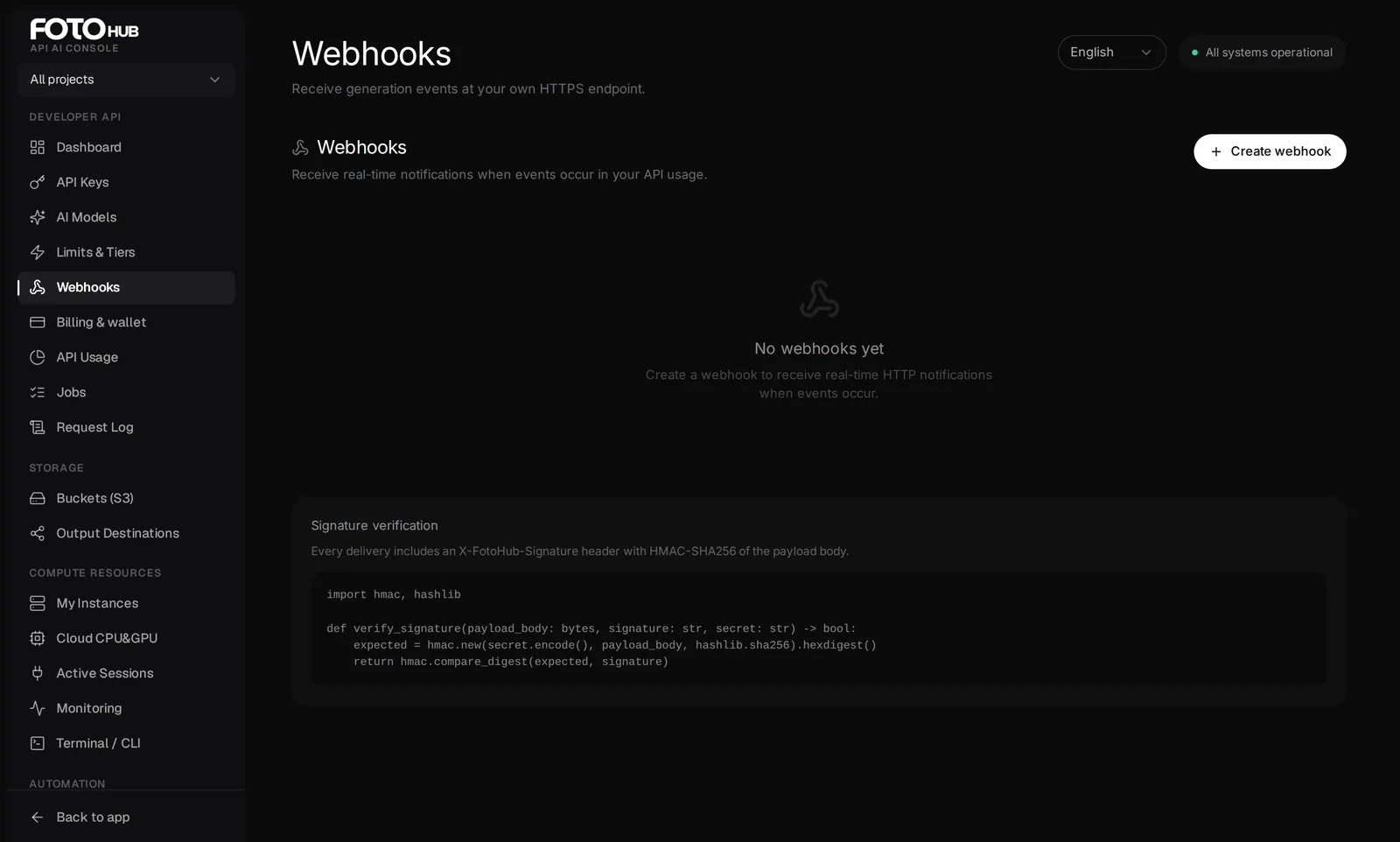
What webhooks do
A webhook is an HTTPS URL on your server that FOTOhub calls when something happens on your account: a generation finished, a charge was made, a refund was issued. Instead of asking "is it done yet?" in a loop, you wait for the call.
There are two kinds. Registered webhooks belong to your account and receive every event you subscribed to, from any key. Per-job callbacks are a URL you pass with one job; the video endpoint, for example, accepts callback_url and posts the finished job to it once. This guide covers registered webhooks in depth and the per-job variants in their own section, because they differ in signing and payload.
Webhook or polling?
- Use a webhook for jobs that outlive a request, for several services that need the same news, and for a ledger that must see every charge and refund.
- Use polling for a single script that waits for one result. It needs no public URL and no secret.
- Use both for anything that matters: the webhook is the fast path, a slow poll is the safety net.
Create a webhook in the console
- Open the Webhooks tab Go to Console → Webhooks (
/console/webhooks) and press Create webhook. An account can hold up to 10 webhooks. - Name it and enter the URL The URL must be HTTPS and must resolve to a public address. Names that point to
localhost, private networks or reserved ranges are refused when you save.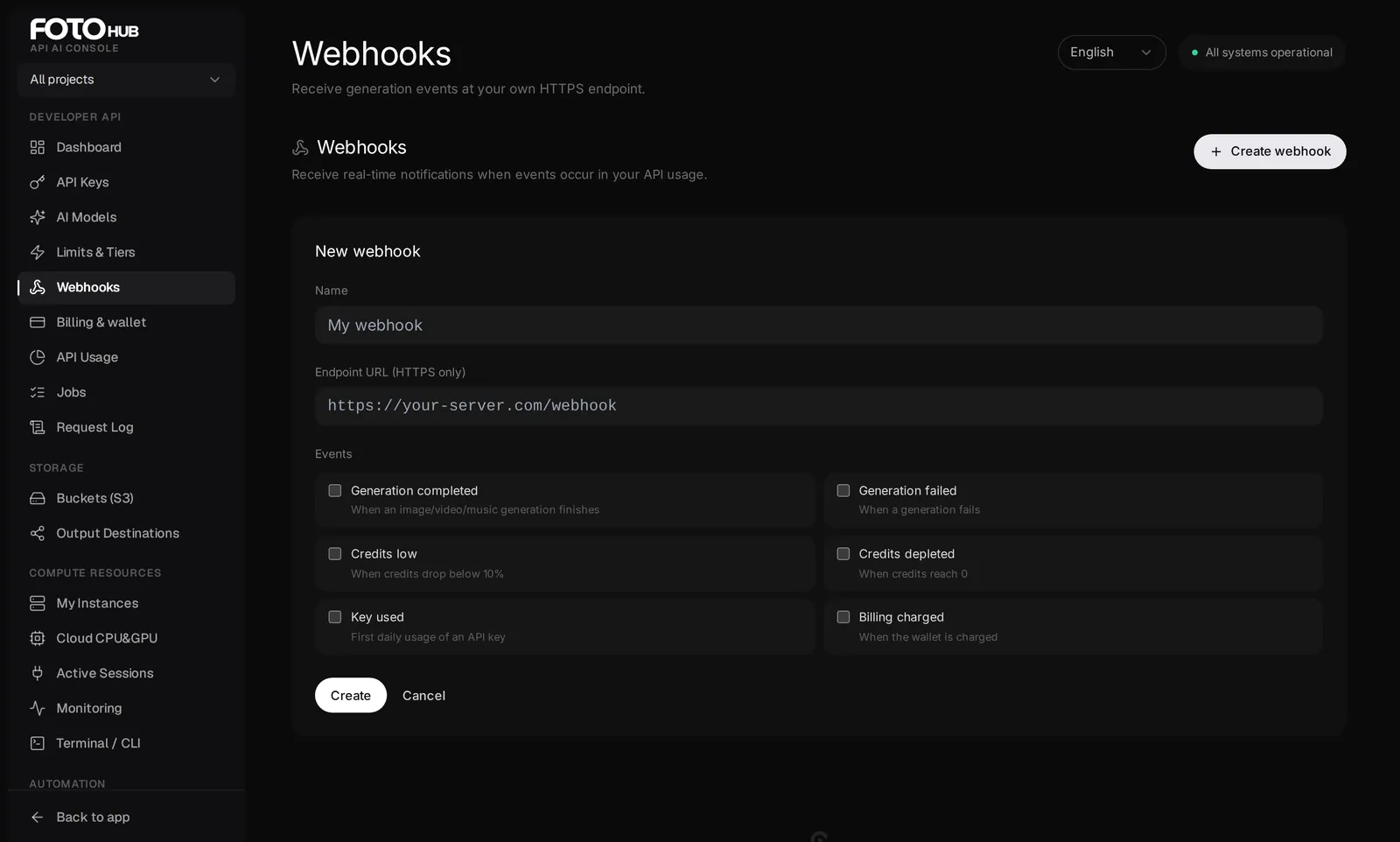
- Pick the events Tick at least one event. The list in the dialog is a short selection of six; the API accepts the full list from the table below.
- Copy the secret After saving, the console shows the webhook secret once. Store it next to your API key. You need it to verify that a call really came from FOTOhub.
- Send a test Press Test. FOTOhub fires a sample delivery of the first event you subscribed to, with
data.testset totrue, and tells you whether your endpoint answered with a success status.
The same operations exist as API calls under /v1/console/webhooks, with a write or admin key: GET and POST on the collection, PATCH and DELETE on /{id}, POST /{id}/test and GET /{id}/logs. You can also add up to 10 custom headers (for example an Authorization header of your own) when you create a webhook through the API.
curl -X POST https://apis.fotohub.app/v1/console/webhooks \
  -H "Authorization: Bearer $FOTOHUB_API_KEY" \
  -H "Content-Type: application/json" \
  -d '{
    "name": "Order pipeline",
    "url": "https://example.com/webhooks/fotohub",
    "events": ["generation.completed", "generation.failed", "billing.charged"]
  }'
Create a webhook. The response contains the secret, once.
The response is 201 with id, name, url, events, active, headers and the 64-character hex secret. Later reads never return the secret again, so a lost one cannot be recovered: see the rotation section.
from fotohub import FotoHub

client = FotoHub()  # needs a Write or Admin key

hook = client.create_webhook(
    "Docs demo",
    "https://example.com/webhooks/fotohub",
    ["generation.completed", "billing.charged"],
)
print("secret shown once:", bool(hook.get("secret")), "id:", hook["id"])

print([h["name"] for h in client.list_webhooks()])
client.delete_webhook(hook["id"])
Python SDK
import { FotoHub } from "fotohub";

const client = new FotoHub({ apiKey: process.env.FOTOHUB_API_KEY! }); // needs a Write or Admin key

const hook = await client.createWebhook({
  name: "Docs demo",
  url: "https://example.com/webhooks/fotohub",
  events: ["generation.completed", "billing.charged"],
});
console.log("secret shown once:", Boolean((hook as { secret?: string }).secret), "id:", hook.id);

console.log((await client.listWebhooks()).map((h) => h.name));
await client.deleteWebhook(hook.id);
TypeScript SDK
Events you can subscribe to
Subscribe only to events that something really sends. This table lists the ones that are emitted today, with the data fields the code puts into them.
| Event | Fires when | data fields |
|---|---|---|
generation.started | An avatar or motion-transfer job was accepted | type, model, cost_usd |
generation.completed | An image, music or other generation finished and was billed | type, model, cost_usd; on some endpoints also currency, job_id, images, tokens, duration |
generation.failed | A generation failed | type, model, error; asynchronous image jobs send job_id, refunded, event_id instead of error |
generation.refunded | The charge of a failed generation was reversed | type, model, cost_usd, job_id |
billing.charged | The wallet was charged | operation, amount_usd, balance_usd, currency |
billing.insufficient_funds | A request was refused with 402 because the wallet is too low | operation, required_usd, balance_usd |
billing.refunded | Money went back to the wallet | operation, amount_usd, reason |
billing.unfunded | A settled operation cost more than the hold and the balance | operation, unfunded_usd |
images.batch.completed | A batch image operation finished | count |
background.removed, background.replaced, background.blurred, shadow.added | The matching image operation finished | cost_usd, plus background_type, blur_radius or shadow_type where it applies |
shorts.job.started, .completed, .failed, shorts.clip.rendered | Shorts clipping job progress | the job body, with clips on .completed and .failed; .clip.rendered adds clip_id and output |
3d.fast.completed | A fast 3D model was delivered | job_id, file_id, detail, triangles, poll_url |
video.remove_object.completed, .failed | Object removal from video finished or failed | completed: job_id, engine, storage_path, url; failed: job_id, error_code, refunded |
job.queued, .started, .progress, .succeeded, .failed, .refunded, .cancelled | Compute jobs submitted to /v1/jobs. job.progress only for jobs that asked for it, at most every 10 points | the same body as GET /v1/jobs/{id} |
commerce.job.completed, .failed, commerce.item.completed | E-commerce catalogue jobs | job and item ids |
Payload catalogue
Every delivery wraps its event data in the same envelope (next section); only data differs. The examples contain only fields the code really sends, with illustrative values. Money fields are plain USD numbers as billed; for current prices see GET /v1/models, GET /v1/pricing and POST /v1/billing/estimate.
Generation events
{
  "event": "generation.completed",
  "timestamp": "2026-10-24T09:12:05.481Z",
  "data": {
    "type": "image",
    "model": "seedream-5-0-260128",
    "job_id": "5d0c1d0e-6a53-4c0e-9f64-0b6f2f3c9a11",
    "images": 2,
    "cost_usd": 0.063,
    "currency": "USD",
    "event_id": "5d0c1d0e-6a53-4c0e-9f64-0b6f2f3c9a11:generation.completed"
  },
  "attempt": 1
}
generation.completed from an asynchronous image job. Synchronous calls send a shorter data without job_id and event_id.
For asynchronous image jobs the stable id sits inside `data.event_id` and has the form {job_id}:generation.completed. These events do not carry the top-level event_id or the X-FotoHub-Delivery header, so read the id from data.
Billing events
{
  "event": "billing.charged",
  "timestamp": "2026-10-24T09:12:05.102Z",
  "data": {
    "operation": "generate_image:seedream-5-0-260128",
    "amount_usd": 0.063,
    "balance_usd": 41.937,
    "currency": "USD"
  },
  "attempt": 1
}
billing.charged. balance_usd is the wallet balance after this charge.
Compute job events
{
  "event": "job.succeeded",
  "event_id": "8b2a6f54-1c0d-4e1b-a7a2-3f9d2c41e7b0:job.succeeded",
  "timestamp": "2026-10-24T09:14:40.007Z",
  "data": {
    "id": "8b2a6f54-1c0d-4e1b-a7a2-3f9d2c41e7b0",
    "kind": "image",
    "model": "seedream-5-0-260128",
    "status": "succeeded",
    "progress": 100,
    "stage": null,
    "position": null,
    "eta": null,
    "created_at": "2026-10-24T09:14:21.330+00:00",
    "started_at": "2026-10-24T09:14:22.118+00:00",
    "finished_at": "2026-10-24T09:14:39.870+00:00",
    "outputs": [
      { "url": "https://example.com/out.png", "mime": "image/png", "width": 2048, "height": 2048, "duration_s": null }
    ],
    "error": null,
    "charge": { "credits": 0, "usd": 0.063, "refunded_credits": 0, "refunded_usd": 0 },
    "processing_region": null,
    "speed": "standard"
  },
  "attempt": 1
}
job.succeeded. data is exactly what GET /v1/jobs/{id} returns, so one parser serves both. The delivery also carries X-FotoHub-Delivery with the same value as event_id.
Shorts and 3D events
{
  "event": "shorts.job.completed",
  "timestamp": "2026-10-24T10:02:11.904+00:00",
  "data": {
    "job_id": "c4a1f0b2-2f70-41d6-8e55-7d0a9c3b1e22",
    "status": "completed",
    "mode": "clips",
    "title": "Episode 42",
    "source_url": "https://example.com/episode-42.mp4",
    "source_type": "url",
    "current_step": "done",
    "steps_completed": ["transcribe", "score", "render"],
    "source_duration": 3120,
    "processing_time_ms": 412000,
    "error": null,
    "created_at": "2026-10-24T09:50:00+00:00",
    "completed_at": "2026-10-24T10:02:11+00:00",
    "reference": "ep-42",
    "clips": [
      {
        "id": "e6b3...", "title": "The hook", "hook": "Nobody tells you this",
        "start": 311.2, "end": 351.8, "duration": 40.6,
        "virality_score": 87, "retention_score": 0.71, "blended_score": 0.8,
        "cover_url": "https://example.com/cover.jpg", "tags": ["tips"], "status": "ready",
        "outputs": [{ "url": "https://example.com/clip.mp4", "aspect_ratio": "9:16", "width": 1080, "height": 1920, "duration": 40.6, "size_mb": 18.4 }]
      }
    ],
    "clip_count": 1
  },
  "attempt": 1
}
shorts.job.completed, trimmed to one clip. The step names and values are illustrative; the field names are the ones the engine sends.
What a delivery looks like
FOTOhub sends a POST with a JSON body and these headers.
| Header | Meaning |
|---|---|
Content-Type: application/json | The body is always JSON |
X-FotoHub-Event | The event name, same as event in the body |
X-FotoHub-Signature | Hex HMAC-SHA256 of the raw body, keyed with your webhook secret (64 hex characters) |
X-FotoHub-Delivery | A stable id for events that have one (the job.* events), so you can drop duplicates. Absent otherwise |
| your custom headers | Any headers you configured on the webhook |
Header names are case-insensitive: a real test delivery reached a public echo service as X-Fotohub-Event and X-Fotohub-Signature. Do not match on the user agent or the source IP; the signature is the proof of origin.
{
  "event": "generation.completed",
  "timestamp": "2026-10-24T00:35:51.120Z",
  "data": {
    "type": "image",
    "model": "seedream-5-0-260128",
    "cost_usd": 0.0315,
    "currency": "USD"
  },
  "attempt": 1
}
The envelope of a generation.completed delivery. Events with an id also carry event_id after event.
timestampis when this attempt was built (ISO 8601 UTC). A retry builds a new body, sotimestampandattemptchange between attempts.- Answer with a
2xxwithin 10 seconds. Anything else is a failure. - Redirects are not followed. A
301or302is a failed delivery, so register the final URL. - On failure FOTOhub retries after about 1 second, then about 2 seconds: three attempts in total, then the event is not delivered again.
- Delivery is at least once and order is not guaranteed: the same event can arrive twice, and a
billing.chargedcan overtake thegeneration.completedthat caused it.
Verify the signature and handle events
Compute the HMAC-SHA256 of the raw request body with your webhook secret, hex-encode it and compare it with X-FotoHub-Signature in constant time. Do not parse and re-serialise the JSON first: the signature covers the exact bytes FOTOhub sent.
import express from "express";
import { createHmac, timingSafeEqual } from "node:crypto";

const SECRET = process.env.FOTOHUB_WEBHOOK_SECRET;
const seen = new Set(); // use Redis or a database table in production

const app = express();

// Keep the raw bytes: the signature covers the body exactly as it was sent.
app.post("/webhooks/fotohub", express.raw({ type: "application/json" }), (req, res) => {
  const expected = createHmac("sha256", SECRET).update(req.body).digest("hex");
  const given = Buffer.from(req.get("X-FotoHub-Signature") ?? "");
  const ok = given.length === expected.length && timingSafeEqual(given, Buffer.from(expected));
  if (!ok) return res.status(401).send("bad signature");

  const evt = JSON.parse(req.body.toString("utf8"));
  const id = req.get("X-FotoHub-Delivery") ?? `${evt.event}:${evt.timestamp}`;
  if (seen.has(id)) return res.status(200).send("duplicate");
  seen.add(id);

  console.log(evt.event, "attempt", evt.attempt, evt.data);
  res.status(200).send("ok"); // answer fast, do the real work after this
});

app.listen(3000, () => console.log("listening on :3000"));
A complete Node receiver (Express)
import hashlib
import hmac
import os
from typing import Optional

from fastapi import FastAPI, Header, HTTPException, Request

SECRET = os.environ["FOTOHUB_WEBHOOK_SECRET"].encode()
seen: set[str] = set()  # use Redis or a database table in production

app = FastAPI()


@app.post("/webhooks/fotohub")
async def fotohub_webhook(
    request: Request,
    x_fotohub_signature: str = Header(default=""),
    x_fotohub_delivery: Optional[str] = Header(default=None),
):
    raw = await request.body()  # the signature covers the exact bytes that were sent
    expected = hmac.new(SECRET, raw, hashlib.sha256).hexdigest()
    if not hmac.compare_digest(expected, x_fotohub_signature):
        raise HTTPException(status_code=401, detail="bad signature")

    event = await request.json()
    event_id = x_fotohub_delivery or f"{event['event']}:{event['timestamp']}"
    if event_id in seen:
        return {"status": "duplicate"}
    seen.add(event_id)

    print(event["event"], "attempt", event["attempt"], event["data"])
    return {"status": "ok"}  # answer fast, do the real work after this
The same receiver in Python (FastAPI)
Reconcile spend with two events
Goal. Keep an internal ledger that matches the FOTOhub wallet to the cent.
Input you can copy.
Subscribe to `billing.charged` and `billing.refunded`. On the first, add a debit row with `operation` and `amount_usd`; on the second, add a credit row with the same `operation`.Why it works. Both events carry amount_usd, so both halves of every money movement reach you. If your ledger and the balance_usd in billing.charged ever disagree, you missed a delivery. Events can arrive out of order, so compare only when the queue is empty.
Idempotency and replay protection
A duplicate is FOTOhub sending an event again, usually because your first answer was slow or failed. A replay is someone else resending a captured request. Handle them separately.
Drop duplicates
Pick the most stable id a delivery offers: the X-FotoHub-Delivery header, then data.event_id, then a key built from job_id and the event (plus clip_id for shorts.clip.rendered).
// Pick the most stable id the delivery offers. Returns null for events without one.
function deliveryKey(deliveryHeader: string | undefined, evt: any): string | null {
  if (deliveryHeader) return deliveryHeader;               // job.* events
  if (evt.data?.event_id) return evt.data.event_id;        // asynchronous generation events
  if (evt.data?.clip_id) {                                  // shorts.clip.rendered: one per clip and render
    return evt.data.job_id + ":" + evt.event + ":" + evt.data.clip_id + ":" + (evt.data.output?.url ?? "");
  }
  if (evt.data?.job_id) return evt.data.job_id + ":" + evt.event;
  return null;                                             // billing.* and other id-less events
}
One key function for every event family
Insert the key in the same transaction as the work. No row returned means you have seen the event: answer 200 and stop. If the work throws, the transaction rolls back and you return 500, so the retry starts clean.
create table webhook_deliveries (
  delivery_key text primary key,
  event        text not null,
  received_at  timestamptz not null default now()
);

-- In the same transaction as the work you do for the event:
insert into webhook_deliveries (delivery_key, event)
values ($1, $2)
on conflict (delivery_key) do nothing
returning delivery_key;
-- No row returned: you have seen this key already, so answer 200 and stop.
A deduplication table (PostgreSQL)
Reject replays with a timestamp window
The timestamp is in the body, not in a header, and the body is exactly what the signature covers. A captured delivery cannot get a new timestamp without breaking the signature. So after the signature check, refuse deliveries whose timestamp is far from your clock. Retries are fine: each attempt is built fresh, one or two seconds after the last.
const TOLERANCE_MS = 5 * 60 * 1000;

// Call this AFTER the signature check: the timestamp is part of the signed body.
function isFresh(evt: { timestamp: string }, now = Date.now()): boolean {
  const sent = Date.parse(evt.timestamp);
  return Number.isFinite(sent) && Math.abs(now - sent) <= TOLERANCE_MS;
}
A five-minute tolerance. Keep your server clock synchronised.
Process a finished job exactly once
Goal. Copy the output of a job.succeeded event into your own storage without ever doing it twice, even when the delivery is retried.
Input you can copy.
Subscribe to `job.succeeded` and `job.failed`. After the signature and timestamp checks, insert `X-FotoHub-Delivery` into the table above. New key: download every URL in `data.outputs`. Conflict: answer `200` and stop.Why it works. If a download fails, return 500: the transaction rolls back and FOTOhub retries within seconds. If all three attempts fail, fetch the job once with GET /v1/jobs/{id}, whose body is identical to data.
Develop and test locally
FOTOhub refuses localhost and private addresses at registration, so your laptop needs a public HTTPS address from a tunnel tool that forwards to a local port.
- Run a receiver Start one of the receiver programs above on port 3000 with
FOTOHUB_WEBHOOK_SECRETset to a placeholder for now. - Open a tunnel Forward a public HTTPS hostname to
localhost:3000. Keep the tunnel running: the hostname must resolve when you save the webhook. - Register the webhook Create it with the tunnel URL plus your path, for example
https://<tunnel-host>/webhooks/fotohub. Copy the secret into the receiver's environment and restart it. - Fire a test and read the log Press Test, watch your receiver print the event, then open Logs to compare what you got with what FOTOhub recorded.
- Follow a changed tunnel URL Tunnels often hand out a new hostname on each start.
PATCHthe webhook instead of recreating it, which keeps the secret.
curl -X PATCH https://apis.fotohub.app/v1/console/webhooks/$WEBHOOK_ID \
  -H "Authorization: Bearer $FOTOHUB_API_KEY" \
  -H "Content-Type: application/json" \
  -d '{"url": "https://new-tunnel-host.example/webhooks/fotohub"}'

# Pause deliveries without losing the secret or the log:
curl -X PATCH https://apis.fotohub.app/v1/console/webhooks/$WEBHOOK_ID \
  -H "Authorization: Bearer $FOTOHUB_API_KEY" \
  -H "Content-Type: application/json" \
  -d '{"active": false}'
Change the URL, or pause a webhook. PATCH accepts any of name, url, events, active and headers.
Rotate secrets
A registered webhook has no rotate button and no rotate route: its secret is generated once, at creation. To change it you create a new webhook and retire the old one. Do it in this order so no event is rejected.
- Make room An account holds at most 10 webhooks; at the limit, creating a new one fails with
409. - Create the new webhook Same events, same URL (or a new path). Store the new secret.
- Accept both secrets Deploy a receiver that accepts a signature made with either secret. During the overlap each event arrives twice, once per webhook, so your deduplication from the previous section earns its keep.
- Delete the old webhook Once the log of the new one shows successful deliveries, delete the old webhook, then drop the old secret from the receiver.
The job-webhook secret (for per-job webhook_url deliveries, next section) rotates in place: GET /v1/console/webhooks/job-secret returns it, creating it on first use, and POST /v1/console/webhooks/job-secret/rotate replaces it. The old secret stops signing immediately. Both routes need a write key or a signed-in session. Fetch any job whose event you missed with GET /v1/jobs/{id}.
Per-job callbacks
Some job endpoints accept a URL for that single job instead of, or in addition to, your registered webhooks. They are separate mechanisms with different guarantees, so check the table before you reuse a receiver.
| Where you set it | Signed with | Body and retries |
|---|---|---|
Compute jobs: webhook_url on POST /v1/jobs | Your job-webhook secret | Registered-webhook envelope, job.* events, 3 attempts |
Shorts clipping: webhook_url, webhook_secret, webhook_events, reference on POST /v1/shorts/clips | The webhook_secret you send (8 to 256 characters); unsigned without it | Same envelope, all four shorts.* events by default, retries after 1 s and 4 s, none on a 4xx |
Video generation: callback_url on the video endpoint (asynchronous models) | Not signed | A flat body (job_id, status, progress, model, then video_url, duration, completed_at or error, refunded), once at the final state, 3 attempts |
All per-job URLs are checked like registered ones: HTTPS only, public addresses only. For compute jobs the check is repeated just before delivery; if it fails, only the per-job delivery is dropped and your registered webhooks still get the event. Per-job deliveries do not appear in the console webhook log, because they belong to no registered webhook.
Wire a clipping job to your pipeline
Goal. Get the finished clips pushed to your server and match them to your own database row.
Input you can copy.
Submit the job with `webhook_url`, a `webhook_secret` of your own and `reference` set to your row id. Verify `X-FotoHub-Signature` with that secret, exactly as for registered webhooks, and look up your row by `data.reference`.Why it works. reference is echoed in every payload, so you need no map from FOTOhub ids to yours. Use shorts.clip.rendered to start on a clip early and shorts.job.completed as the final trigger; one receiver handles both.
Limits at a glance
| What | Limit |
|---|---|
| Webhooks per account | 10 |
| URL | HTTPS only, up to 2048 characters, must resolve to a public address |
| Custom headers | Up to 10; name up to 256, value up to 4096 characters |
| Answer time | 10 seconds per attempt |
| Attempts | 3 in total, about 1 s then about 2 s apart |
| Delivery log | Last 50 entries per webhook, response stored up to 1000 characters |
| Who may manage | Write or admin key to create, change, delete and test; any key to list and read logs |
Test, inspect and debug deliveries
Every attempt is logged. In the console, Logs on a webhook opens its recent deliveries; over the API, GET /v1/console/webhooks/{id}/logs returns the last 50 with the event, the payload that was sent, your endpoint's HTTP status, the first 1000 characters of your response and whether it counted as a success.
{
  "event": "generation.completed",
  "payload": { "event": "generation.completed", "attempt": 1, "data": { "test": true } },
  "response_status": 200,
  "success": true,
  "attempted_at": "2026-10-24T00:41:34.200Z"
}
One entry of the delivery log, trimmed
payload is the full envelope exactly as sent, so the log doubles as a copy of every event. A real test entry looked like this on the wire: 203 bytes, {"event":"generation.completed","timestamp":"...","data":{"test":true,"timestamp":"...","webhook_id":"..."},"attempt":1}. When the connection itself fails (DNS, TLS, timeout, refused), response_status is 0 and response_body holds the error text instead of your answer.
Delivery failure runbook
Nothing in the delivery path switches a failing webhook off: it stays active and every new event is tried three times. After the third failure that event is not delivered again, and there is no replay button. Read the log from the top.
| Log shows | Likely cause | Fix |
|---|---|---|
response_status: 0 | DNS, TLS, refused connection or the 10 second timeout | Read response_body for the error text. Check certificate chain and that the host is up. Answer first, work later |
301 / 302 / 308 | Redirect, for example http to https or a trailing slash | Register the final URL with PATCH |
401 / 403 | Your signature check rejects the delivery, or a gateway blocks it | Verify against the raw bytes, with the right secret, before any JSON parsing or body middleware |
200, but nothing happens | The webhook is not subscribed to that event, or the handler skips test events | Check events with GET /v1/console/webhooks |
Recover what you missed
A missed event is a lost notification, not lost data. For compute jobs, GET /v1/jobs/{id} returns the body the event would have carried; for image and video jobs use the poll route of the endpoint you called. Run a small reconciliation job every few minutes over anything still pending, and a webhook outage becomes a delay instead of an incident.
- Test says my endpoint did not return a success response.
- Open Logs and read
response_statusandresponse_body. The usual causes are a 301 fromhttptohttps, a signature check that rejects the test, or a firewall that blocks the sender. - Creating a webhook fails with "must not point to a private or reserved IP address".
- Use a public HTTPS URL. For local development, expose your machine through a tunnel and register the tunnel's HTTPS address.
- I get an "Invalid events" error.
- An event name is misspelled or not on the allowed list. The error message lists the allowed names. Duplicates in the same webhook are rejected too.
- Can a read-only key manage webhooks?
- It can list them and read logs, but creating, changing, deleting and testing need a write or admin key, because creating one hands out a signing secret.
- My signature never matches.
- Almost always the body was parsed before hashing. In Express use
express.raw, notexpress.json; in FastAPI readrequest.body(). Also check that you copied the secret of this webhook (each has its own), that no trailing newline came with it, and that a custom header did not overwriteX-FotoHub-Signature.
Production checklist
- The signature is checked on the raw body, in constant time, before any parsing.
- Duplicates are dropped by key in the same transaction as the work; id-less events are safe to retry.
- The handler answers within a second or two and moves slow work to a queue.
- The secret lives in a secret store, never in code or logs, and you know how you would rotate it.
- A reconciliation job looks up anything still pending, so one lost delivery is a delay.
Next: the errors and limits guide for the failures of the calls that produce these events, the API keys guide for key scopes, the video guide for callback_url, and the TypeScript and Python SDK guides for the webhook helpers.