Plans and credits
Understand what a credit is, where you see the price before anything runs, what the plans change, what happens when credits run out and how refunds and invoices work.
What a credit is
FOTOhub does not charge per tool or per download. Almost everything that costs real computing power, such as an image, a video, a piece of music or a voice-over, is paid for with credits. A credit is just the unit the app counts in. It appears as cr next to prices and balances.
Your plan gives you a pool of credits that refills every 30 days (not on the first of the calendar month). Cheap or simple actions cost a fraction of a credit, big ones cost several. You never have to guess: the price of a run is shown before you start it, and the price you see is the price that is charged.
- Plan credits are the pool that comes with your plan. They refill every 30 days. Unused plan credits do not carry over to the next period.
- Bonus credits are a separate balance that comes from a Buster Pack, a gift or promo code or a trial. They are spent first, before plan credits.
- Free actions cost no credits at all. Editing in the photo editor in your browser is one example, and so is the free upscale on the image generator.
Where you see your balance
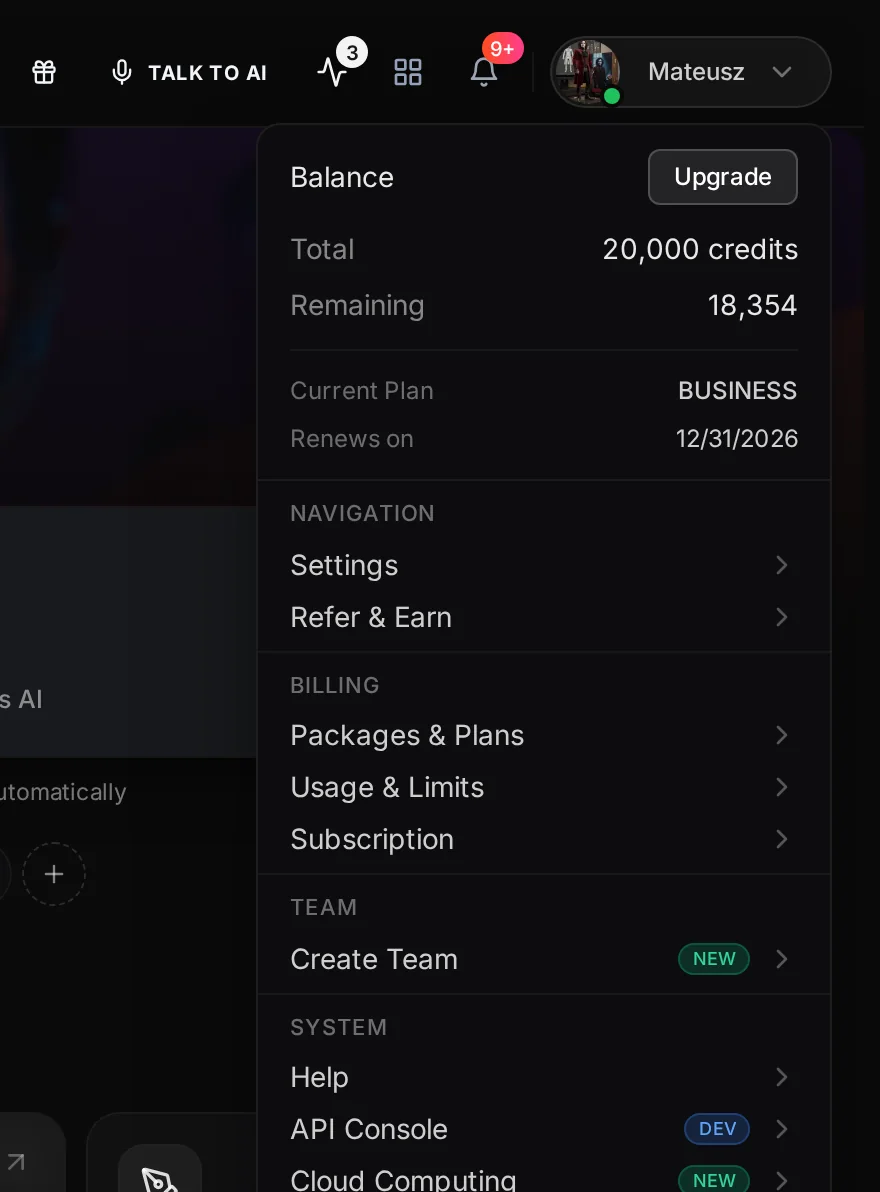
Your balance is always one click away. The quickest place is the account menu: click your name at the top right and look at the Balance card. It shows Total, Remaining, your Current Plan, the date it Renews on and an Upgrade link.
Many generators and studios also show a small credits left chip in their header. Hover over it to see how your plan credits and bonus credits add up and how much of the 4-hour window is left. For the full picture open Settings, Usage & Limits, which is described below.
Seeing the price before you run
Owner rule number one: you are never charged an amount you did not see first. The price is calculated from the same price table the server charges from, for your own plan.
In the image generator
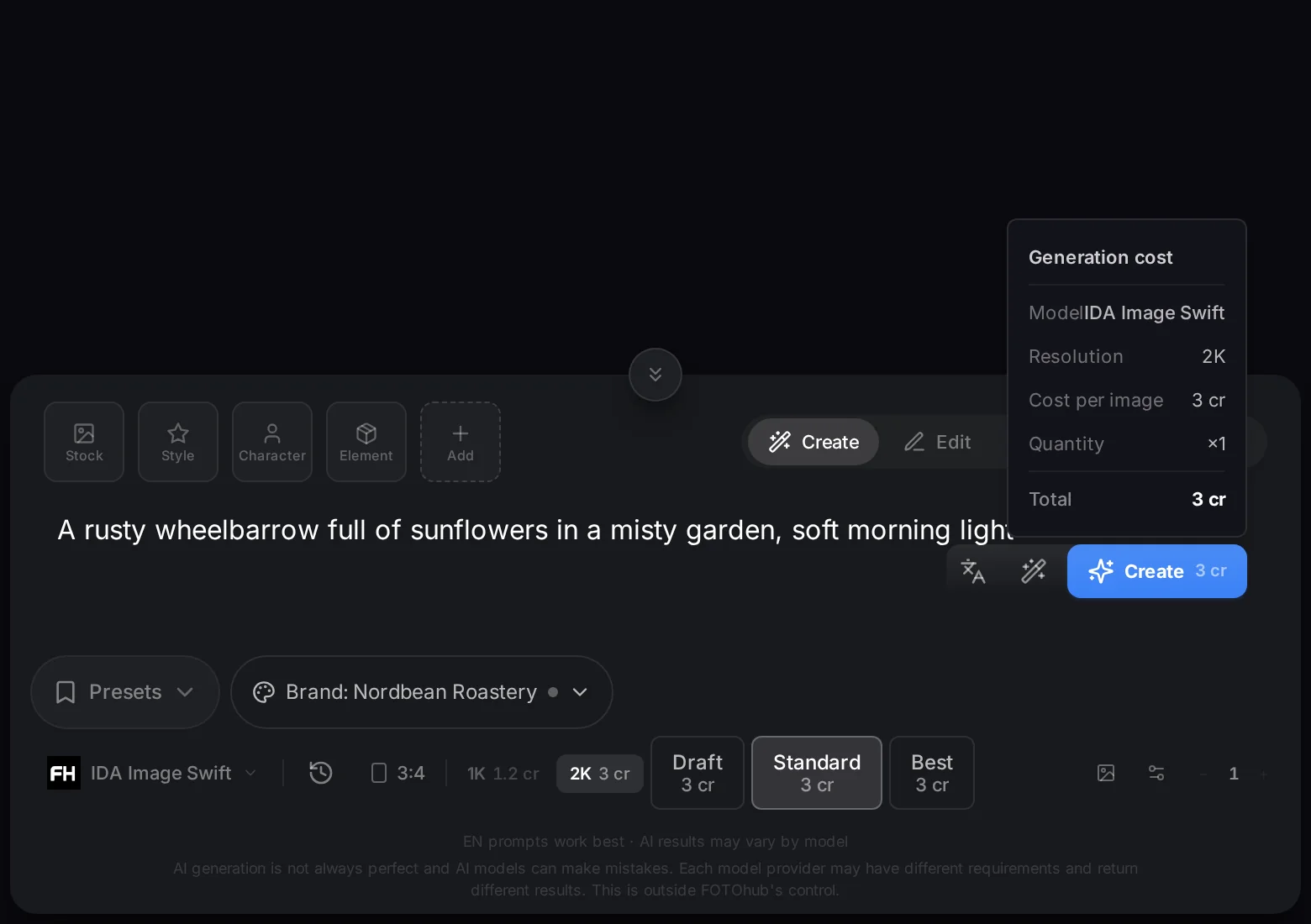
The Create button carries a small chip with the total in cr, for example the price per image multiplied by the number of images you asked for. Hover over the button for a breakdown: model, resolution, cost per image, quantity and total. Each model card in the model picker also shows its price, and a model that does not fit what you have left is marked LIMIT REACHED.
In the video generator and other tools
The video generator shows the price on its create button too, worked out from the length and the quality you picked. Tools that start a bigger job, such as the editor tools in the photo editor, open a small run dialog with the line Price and a button that reads Run followed by the price, or Run, included when it is free for you.
Not every tool has been built the same way, so if you open a tool and cannot find a price, the tool does not charge for that action. Chat messages are the exception that is not priced one by one: they are counted per message or per amount of text, depending on the model.
What is free and what is charged
| What you do | How it is charged |
|---|---|
| Image generation | Per image, at the price of the model and resolution you pick. |
| Video generation | Per video or per second of video, depending on the model. Longer or sharper costs more. |
| Music, voice and sound | Per run, per minute or per 1,000 characters, depending on the tool. On paid plans the audio generators that run on FOTOhub's own hardware cost no credits. |
| Editor tools in the photo editor and Design Studio | Plain editing (adjustments, filters, crop, brushes) is free. GPU tools such as remove background or upscale are charged per run, and the price is shown in the run dialog. |
| Upscale in the image generator | Free (the tile says no credits). The Pro upscale shows its own price. |
| AI chat | Per message or per amount of text, depending on the model. |
| Gabriel AI on the dashboard (Auto mode) | The routing itself is not charged. What it opens afterwards follows that tool's own rules. |
| Opening a tool with Continue with... | Free. Handing a file to another tool never costs anything. Only the run you start there does. |
| Storage | Billed separately in money, not credits, and only for storage buckets you create yourself. |
The plans
There are six plans you can pick yourself: Free, Starter, Medium, Professional, Business and Teams, plus Enterprise, which is priced individually and bought through the sales contact. Open the plan page from the account menu (Packages & Plans) or from the Upgrade link to compare them. Prices and credit amounts are on that page and change over time, so this guide does not quote them.

What actually differs between plans, as the app enforces it today:
- Credits per period and the size of the 4-hour window grow with the plan.
- The 4-hour window applies to Free, Starter and Medium. Professional, Business and Teams do not have it, and neither does anyone with an active Buster Pack.
- A few image models are credit-free (0 cr) on Professional and Business, within a daily fair-use limit. The model card says UNLIMITED.
- Some video models have daily limits per model that depend on your plan, and 4K video needs Professional or higher.
- Audio generators on FOTOhub's own hardware are included in every paid plan.
- Teams share one credit pool between all members. Members are charged from the team pool, so personal numbers do not apply to them.
Billing cycles are monthly, quarterly, half-yearly or yearly. Longer cycles carry a discount that the page shows as Save and a percentage. Even on a yearly plan your credits are refilled every 30 days.
The Usage & Limits page
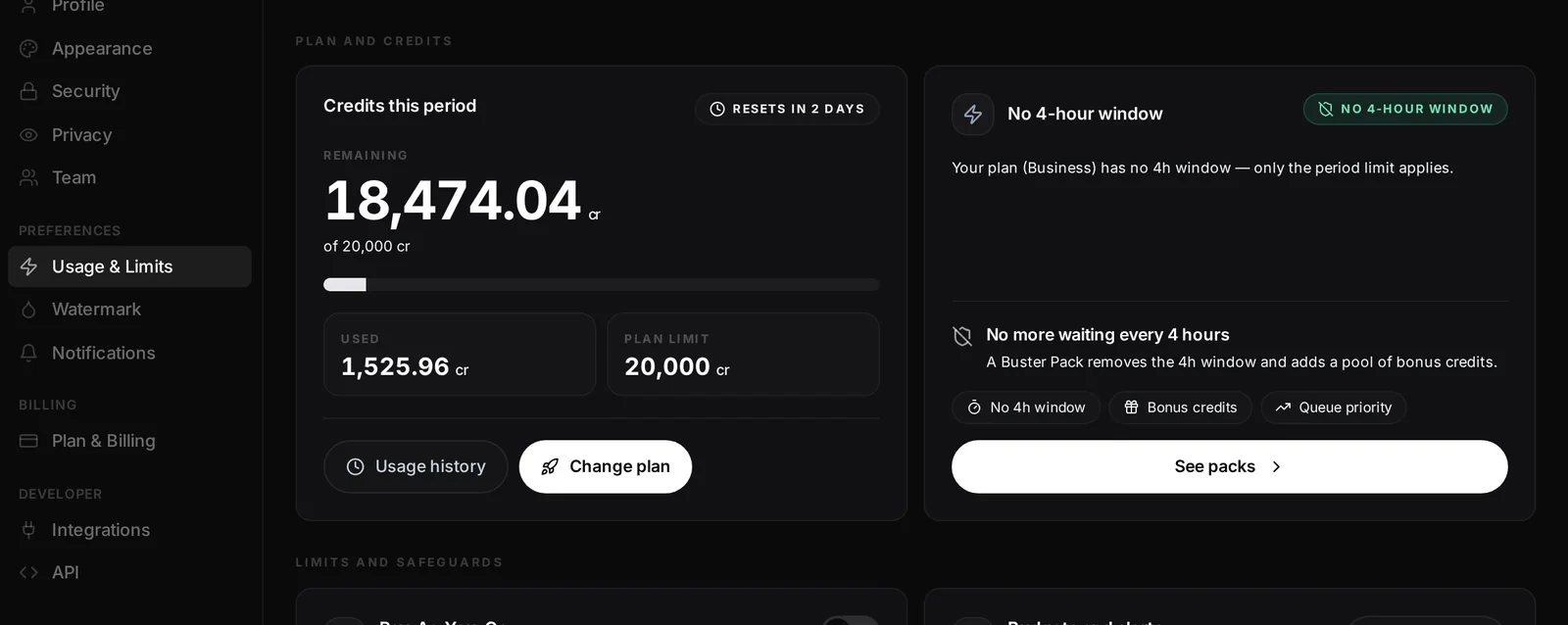
Open it from Settings, Usage & Limits or from the account menu. It is the place to answer the questions "how much have I used?" and "when does it reset?".
- Credits this period: Remaining, Used, Plan limit and Bonus, with a meter. The buttons Usage history and Change plan sit on the card.
- 4-hour window: how much you have spent in the current window and when it resets. Accounts without a window see a card that says so.
- Usage (30 days): a bar chart of your daily net usage. Credits and money are always shown separately and never added together.
- Extra costs this month: anything charged in money outside your subscription, such as storage buckets.
- Usage history and Model pricing: two links to the full ledger and to a plan-aware price list.
When you have used everything, a red banner says Credits exhausted with a Top up credits button. When you reach 85 percent of your limit an amber banner warns you that the credits will run out before the reset at your current pace.
Usage history: every charge and refund
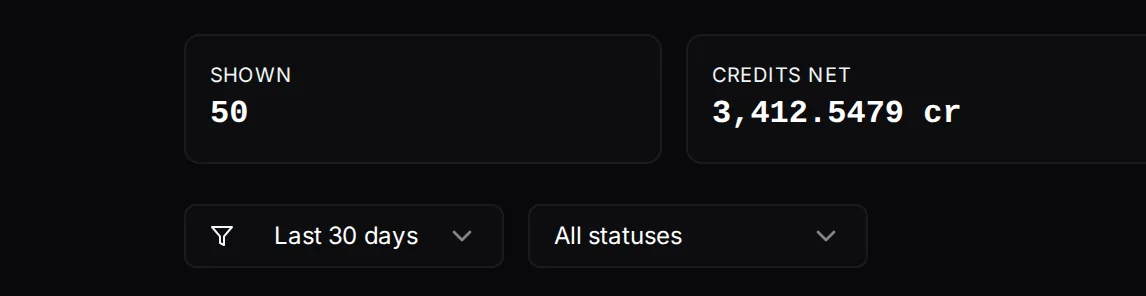
Usage history lists every operation: date, item, credits, money and a status badge. Pick a range (7, 30, 90 or 365 days) or a status such as Refunded. The summary at the bottom gives Charged, Refunded and Net, and Download CSV exports the table.
The 4-hour window
On the Free, Starter and Medium plans there is a second limit besides your monthly credits. It caps how many credits you can spend within a rolling 4 hours. The idea is protection against accidents, for example a runaway batch that would burn the whole month in an afternoon.
- The window starts at your first charge and restarts 4 hours later.
- When a run does not fit, you see 4h limit reached with the credits left and the credits needed. The limit renews by itself.
- The Usage page shows the time left until the reset.
- Professional, Business, Teams and Buster Pack holders do not have this limit.
Buster Packs: more credits, no waiting
A Buster Pack is a one-time purchase, not a subscription. It does two things: it removes the 4-hour window for as long as the pack lasts and it adds bonus credits that are spent before your plan credits. It works on top of any plan, including Free.
- Open the packs Go to Settings, Buster Packs, or click Top up credits on the Usage page.
- Pick a pack The packs differ in credits and in how long the 4-hour exemption lasts: from a few days to lifetime. The page also explains why the 4-hour window exists and compares a standard plan with a pack.
- Click Buy now A summary dialog shows the total and whether tax is included. Click Continue to payment to go to the secure card page. FOTOhub does not store your payment details.
- Come back The pack activates as soon as the payment is confirmed, and the credits are added to your existing balance. A second pack adds its credits to the first.
What happens when you run out
FOTOhub has a hard stop, not an overdraft. When a run does not fit into what you have left, it simply does not start, and nothing is charged. You get a message that tells you which limit you hit.
| What you see | What it means | What to do |
|---|---|---|
| 4h limit reached | You spent your 4-hour window. | Wait until it renews, or get a Buster Pack, which removes the window. |
| Monthly limit reached | Your plan credits for this period are used up. | Wait for the reset (shown as Resets in N days), top up with a pack or change plan. |
| Monthly limit and bonus credits used up | Both pools are empty. | Buy a Buster Pack or upgrade. |
| Not enough credits | This particular run costs more than you have. | Pick a cheaper model or a smaller setting, or top up. |
| Credit limit reached (error card) | The server refused because a limit was used up. | Open Settings, Usage & Limits and check which one. |
The generator checks this before it sends anything and shows a notice with a Check Limits and Usage button that opens the Usage page.
What still works at zero credits
- Everything that is free: editing in the photo editor, the free upscale in the image generator, browsing your library and settings.
- Credit-free models on Professional and Business, until the daily fair-use limit.
- Audio generators on FOTOhub's own hardware on paid plans.
- Waiting. Your 4-hour window and your period both reset by themselves.
Failed runs and automatic refunds
Generators charge before the work starts, and give the credits back automatically when the work fails. You do not need to ask. The failure message says so, for example Credits for this attempt were refunded, and the refund shows up in Usage history as its own row with a Refund badge. Credits go back to the pool they came from, so bonus credits return to the bonus balance.
- If you asked for four images and one failed, only the failed one is refunded. The three you got stay paid.
- A request that was blocked by a content filter is either never charged or refunded.
- If you cancel a queued job before it starts, you get the credits back. A job that has already started cannot be refunded when you cancel it.
- The editor tools (remove background, upscale and so on) have a refund budget per account. After many failures in a short time the app can keep a charge and tells you so, and you can contact support.
- Chat and analysis features are charged per message. Do not count on an automatic refund there.
Upgrade, downgrade, cancel
Everything about your subscription lives in Settings, Plan & Billing, Subscription.
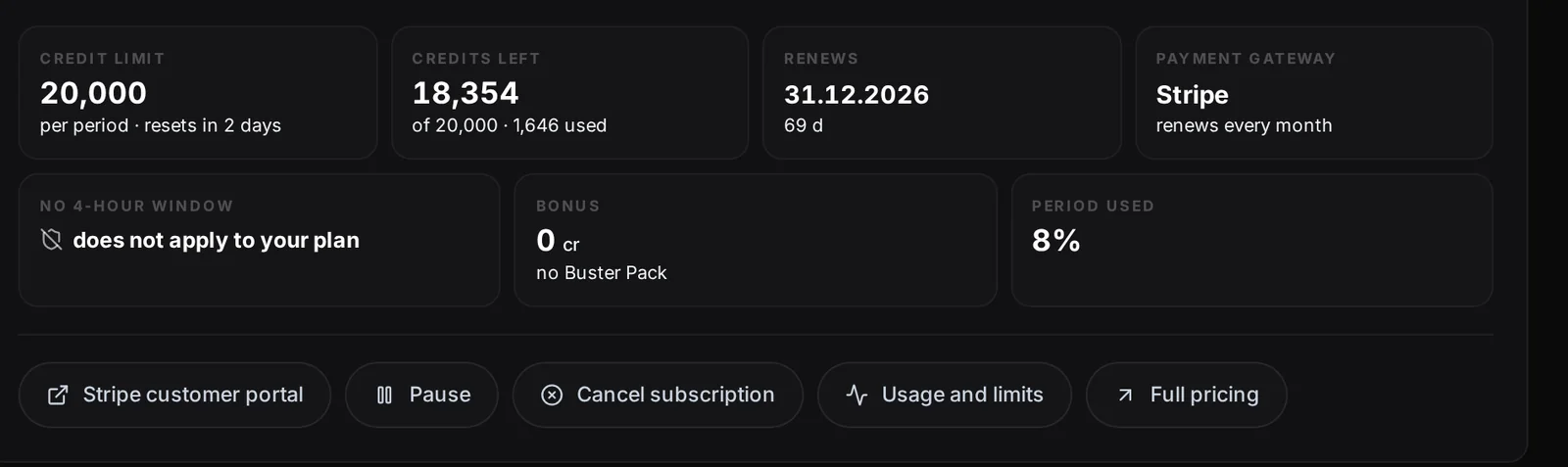
- Upgrade: you pay now for the rest of the current period, pro rata, the new plan starts immediately and you get the matching credits for the rest of the period. At the next renewal you get the full amount.
- Downgrade: your current plan stays active until the end of the period, then switches to the lower one. A card called Scheduled plan change shows it, and you can cancel the change.
- Cancel subscription: the plan stays active until the end of the paid period. Then the account becomes a Free account. You can reactivate before it ends.
- Stripe customer portal: opens a secure page where you update your card, pay an open invoice or look at receipts.
- Gift or promo code: click the gift icon at the top, or the I have a gift code link on the plan page. One promo code can be used per account.
Invoices and payment documents
Invoices appear under Settings, Plan & Billing, Invoices after your first payment. The table lists number, issue date, due date, amount, status and source. You can filter by status and search by number.
- Rows labelled System are FOTOhub's own documents. Download document opens the invoice as a page in a new tab, which you can print or save as PDF from your browser.
- Rows labelled Card come from the card processor. Their documents live in the Stripe portal, and the button tells you so.
- Checkout promises an invoice within 3 business days. If one is missing after that, use the Complaint button on the billing page (type Invoice) or write to support.
Questions people ask
- Why does my credit chip show nothing on the Create button?
- The model you picked costs nothing on your plan, or the price is still loading. Open the model picker: free models show 0 cr and UNLIMITED. A model without any price is disabled on purpose.
- Do unused credits roll over?
- Plan credits do not. They are refilled every 30 days. Bonus credits from packs and codes stay until you spend them.
- Which credits are spent first?
- Bonus credits first, then your plan credits.
- I bought a pack and still see the 4-hour card.
- On Professional, Business and Teams there is no window to remove, so the pack only adds bonus credits. On other plans the card changes to say the pack removed the window and shows until when.
- Can I see what a refund did?
- Yes. In Usage history the original charge turns Refunded or Partly refunded, and a negative row shows how many credits went back to which pool.
- Where is the Pause button for my subscription?
- Pausing is not available. You can cancel at the end of the period or downgrade.